Produktübersicht
Ducalis ist eine einheitliche Plattform für Produktentscheidungen, die Kundenfeedback, Teampriorisierung und Stakeholder-Kommunikation verbindet. Triff bessere Produktentscheidungen schneller, mit voller Transparenz und Kundeneinbindung.
Was ist Ducalis?
Produktteams stehen vor einer gemeinsamen Herausforderung: das Ausbalancieren konkurrierender Prioritäten von Kunden, internen Stakeholdern und Geschäftszielen. Ducalis löst dies, indem es ein transparentes, datengetriebenes System bereitstellt, um zu entscheiden, was als Nächstes gebaut wird.
Die Plattform besteht aus drei miteinander verbundenen Modulen:
- Feedback & Voting — Sammle und organisiere Ideen von Kunden und internen Teams
- Priorisierung — Bewerte, evaluiere und stimme dein Team darauf ab, was als Nächstes gebaut wird
- Release-Kommunikation — Halte Stakeholder mit automatisierten Updates informiert
Wer nutzt es
Ducalis bedient verschiedene Rollen in deiner Organisation:
| Rolle | Hauptnutzung |
|---|---|
| Produktmanager | Backlog priorisieren, Kundenfeedback sammeln, Roadmap kommunizieren |
| Entwicklungsteams | Technischen Aufwand bewerten, Priorisierungsgrundlage verstehen, verfolgen was ausgeliefert wird |
| Customer Success | Kundenanfragen einreichen, Feature-Status verfolgen, Updates teilen |
| Führungsebene | Teamübergreifende Prioritäten ansehen, Liefermetriken verfolgen, Kundenbedürfnisse verstehen |
| Marketing-Teams | Eine einzige Informationsquelle für ihre Pläne, Verwaltung von Anfragen und Produktionsprozessen |
Modul 1: Feedback & Voting
Was du bekommst
Erfasse jede Kundenstimme an einem Ort. Ob Feedback aus Support-Tickets, Messenger-Konversationen, E-Mails oder aus deinem Produkt selbst kommt, Ducalis konsolidiert es in einen einzigen, organisierten Backlog von Ideen.
Voting Boards
Voting Boards sind Seiten, auf denen Kunden und Teammitglieder Ideen einreichen und darüber abstimmen.
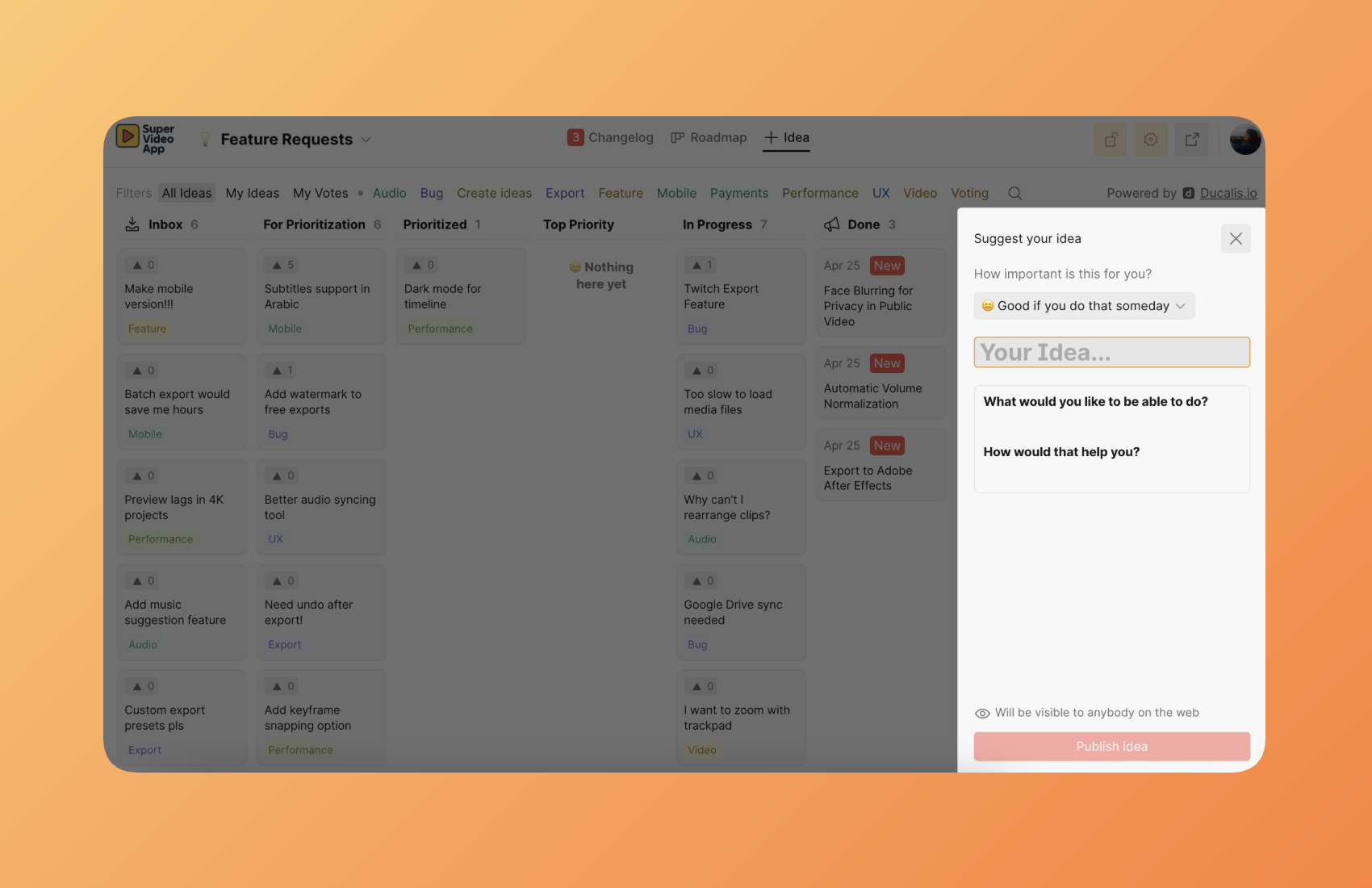
Der leistungsstärkste Ansatz: Bette das Voting Board direkt in dein Produkt ein.
Wenn du Ducalis als Widget in deine Anwendung einbettest, wird es zu einer unsichtbaren Erweiterung deines Produkts. Nutzer reichen Feedback ein, stimmen über Ideen ab und verfolgen den Feature-Status, ohne jemals deine Oberfläche zu verlassen. Es gibt keine externen Links, keinen Kontextwechsel, keine Reibung — Feedback-Sammlung geschieht natürlich als Teil der Produkterfahrung.
Dies entfernt die Grenzen zwischen deinem Produkt und der Feedback-Sammlung. Kunden denken nicht „Ich muss zu einem Feedback-Portal gehen." Sie interagieren einfach mit etwas, das sich wie eine native Funktion deines Produkts anfühlt.
Bereitstellungsoptionen:
- Eingebettetes Widget (empfohlen) — Mache Ducalis zu einer unsichtbaren Erweiterung deines Produkts
- Eigenständige Seite — Hoste ein dediziertes Feedback-Portal mit deinem individuellen Branding
- Öffentlicher oder privater Zugriff — Kontrolliere, wer Ideen ansehen und einreichen kann
- SSO-Integration — Authentifiziere Nutzer über deinen bestehenden Identity-Provider
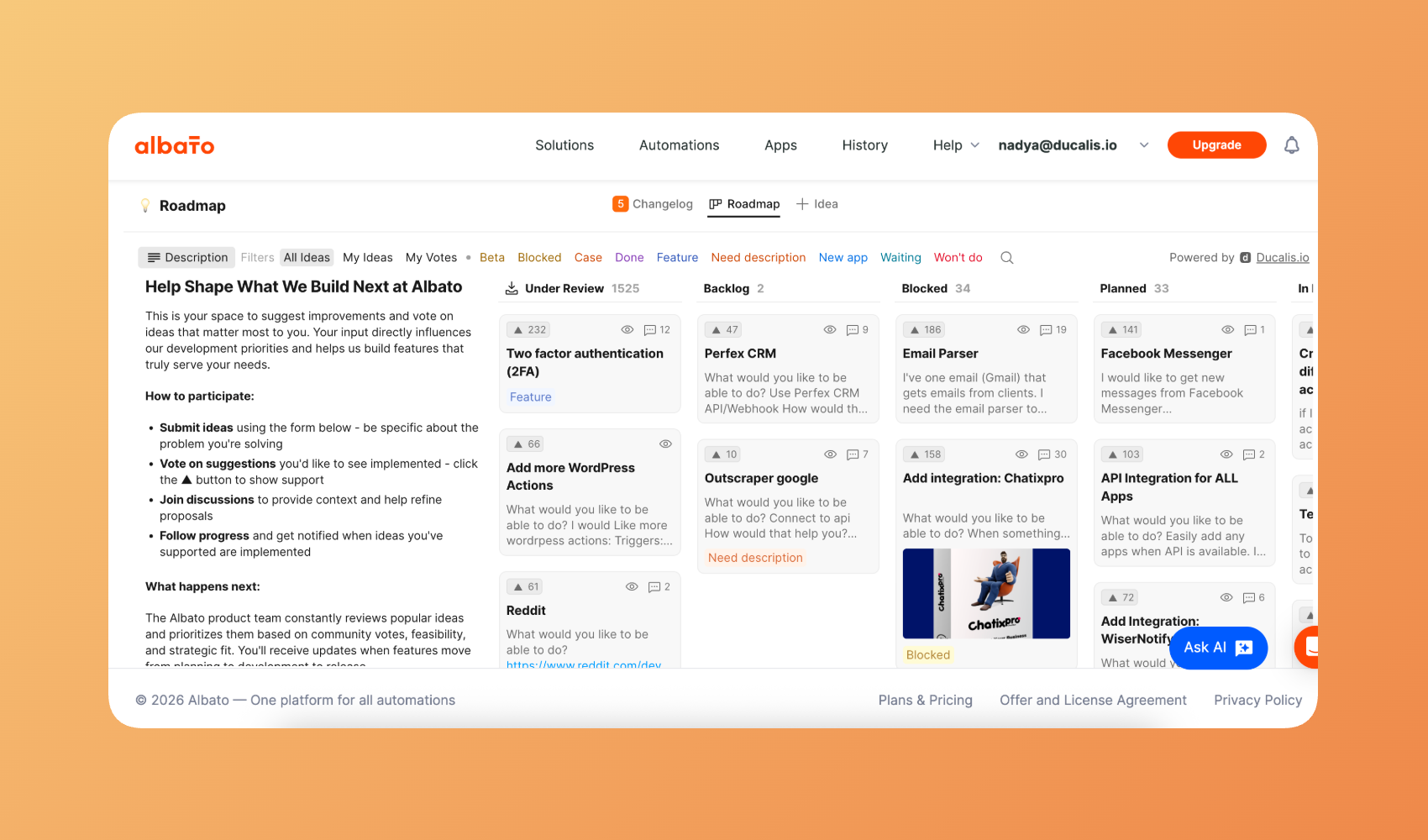
Mehr erfahren über Voting SDK.
Multi-Channel Ideenerfassung
Sammle Ideen von überall, wo deine Kunden kommunizieren:
| Kanal | Wie es funktioniert |
|---|---|
| Messenger-Bots | Leite Nachrichten von Telegram, Slack, Mattermost oder Discord weiter, um automatisch Ideen zu erstellen |
| E-Mail-Weiterleitung | Leite Kunden-E-Mails weiter, um sie in verfolgbare Ideen umzuwandeln |
| Eingebettetes Widget | Füge ein Feedback-Formular in die Oberfläche deines Produkts ein |
| Interne Einreichungen | Teammitglieder reichen Ideen im Namen von Kunden oder aus internen Diskussionen ein |
| Task Tracker Backlog | Erstelle Feedback aus deinem bestehenden Backlog |
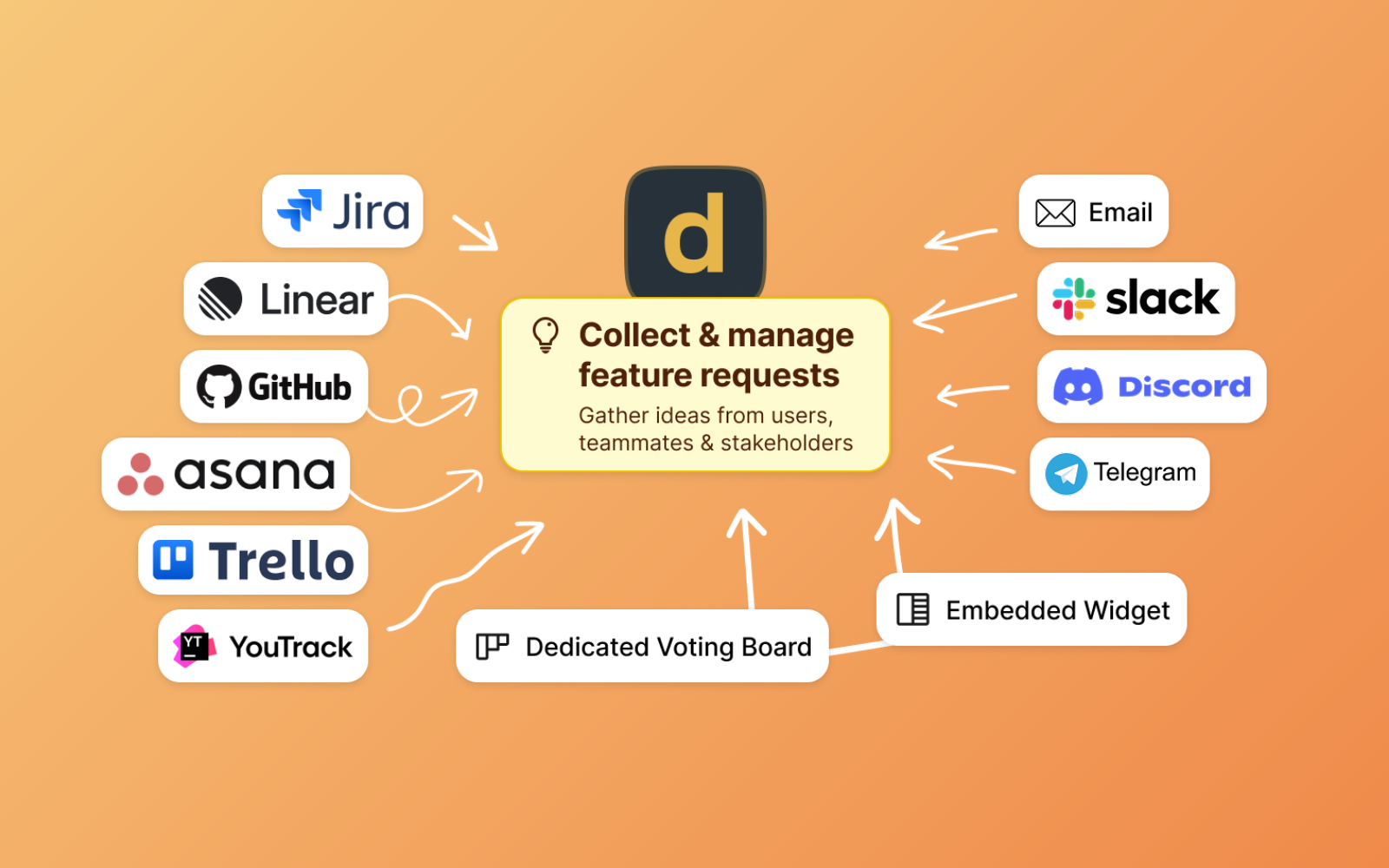
Mehr erfahren über das Sammeln von Feedback aus verschiedenen Quellen.
KI-gestützte Verarbeitung
Ducalis nutzt KI, um das Ideenmanagement zu optimieren:
- Sprachnachrichten-Transkription — Konvertiere Audionachrichten in Text-Ideen
- Ideen-Vorlagen — Schreibe rohes Feedback basierend auf deiner Vorlage in ein einheitliches Format um
- Duplikatserkennung — Identifiziere und führe ähnliche Ideen zusammen, um Stimmen zu konsolidieren

Mehr erfahren über Ducalis AI.
Wie Feedback fließt
Modul 2: Priorisierung
Was du bekommst
Ersetze Meinungen durch datengetriebene Teamentscheidungen. Anstatt dass die lauteste Stimme gewinnt, erfasst Ducalis die Bewertung aller und zeigt, wo dein Team übereinstimmt — und wo ihr diskutieren müsst.
Anpassbare Kriterien
Definiere deine eigenen Bewertungskriterien, die zu der Art und Weise passen, wie deine Organisation Entscheidungen trifft:
- Wertkriterien — Auswirkung auf Aktivierung, Retention, Umsatz oder Kundensegmente
- Aufwandskriterien — Backend-Zeit, Frontend-Zeit, Design-Aufwand oder beliebige individuelle Faktoren
- Gewichtete Wichtigkeit — Weise verschiedenen Kriterien unterschiedliche Gewichtungen zu, die mehr zählen
- Rollenbasierte Zuweisung — Entwickler bewerten Aufwand, PMs bewerten Geschäftswert
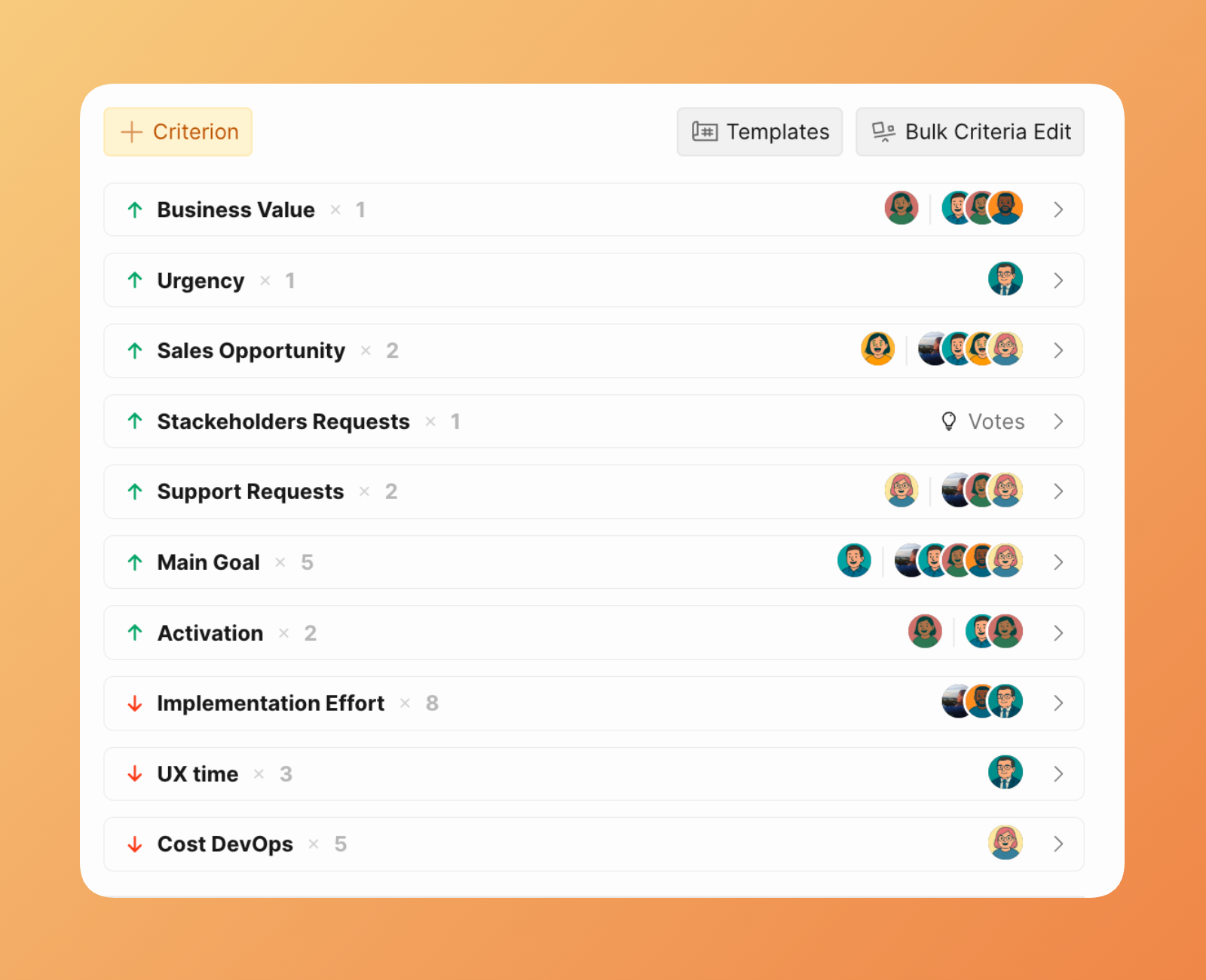
Mehr erfahren über Kriterieneinstellungen und Templates.
Evaluation Poker
Ducalis verwendet einen „geheimen Abstimmungs"-Ansatz, inspiriert von Planning Poker:
- Bewertungen sind verborgen — Teammitglieder bewerten Vorgänge, ohne die Bewertungen anderer zu sehen
- Gemeinsam aufdecken — Sobald alle bewertet haben, werden alle Bewertungen gleichzeitig aufgedeckt
- Unterschiede diskutieren — Wenn Bewertungen deutlich abweichen, diskutiert und erreicht einen Konsens
Dies verhindert Verankerungsfehler, bei denen frühe Meinungen alle anderen beeinflussen.
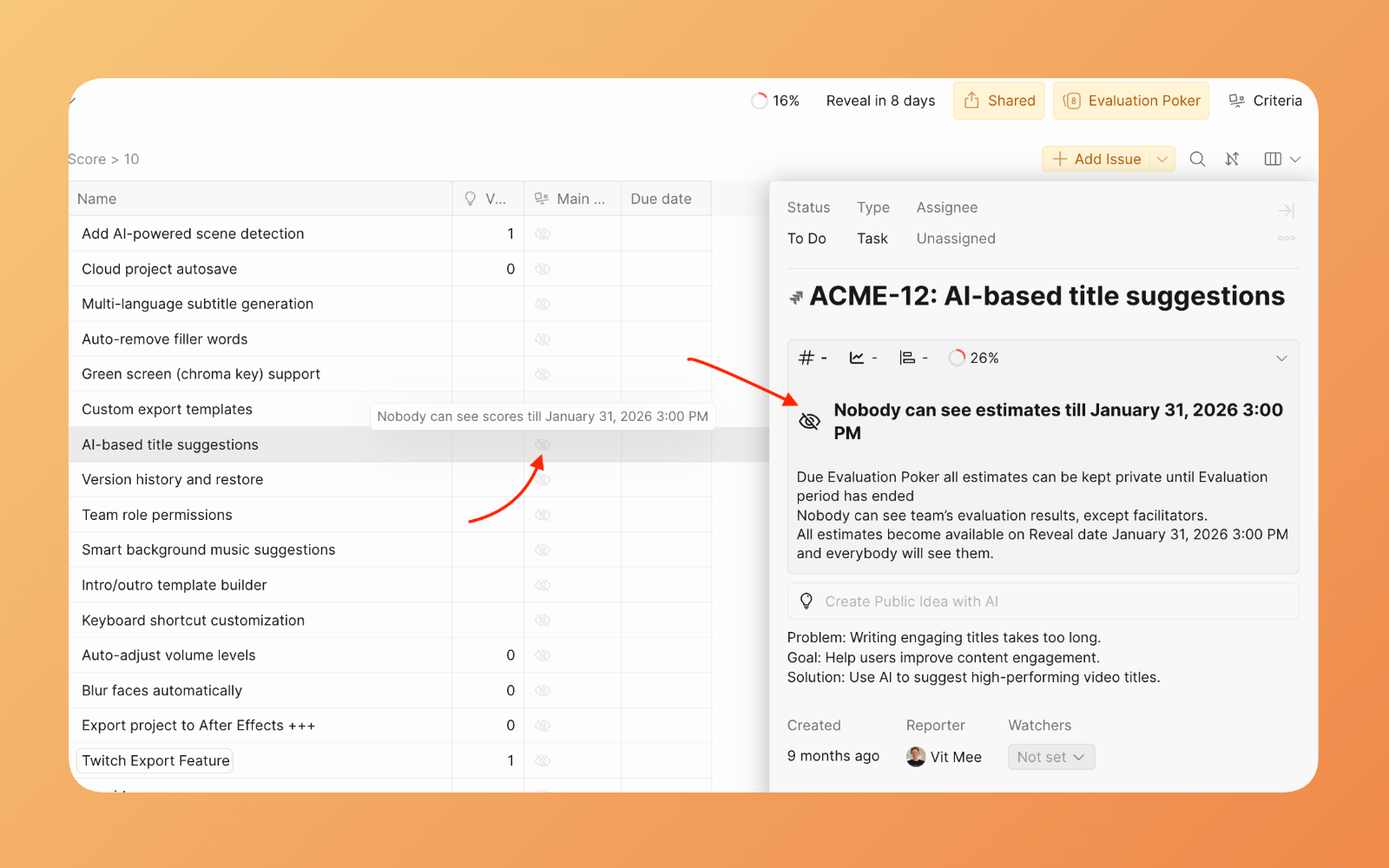
Mehr erfahren über Sprint Planning.
Übereinstimmungs-Tracking
Der Übereinstimmungsindikator zeigt, wo dein Team übereinstimmt und wo Diskussion erforderlich ist:
- Hohe Übereinstimmung — Team stimmt über die Priorität überein; fahrt mit Zuversicht fort
- Niedrige Übereinstimmung — Signifikante Uneinigkeit besteht; diskutiert vor der Entscheidung
- Mittlere Übereinstimmung — Gut zu diskutieren, aber nicht kritisch
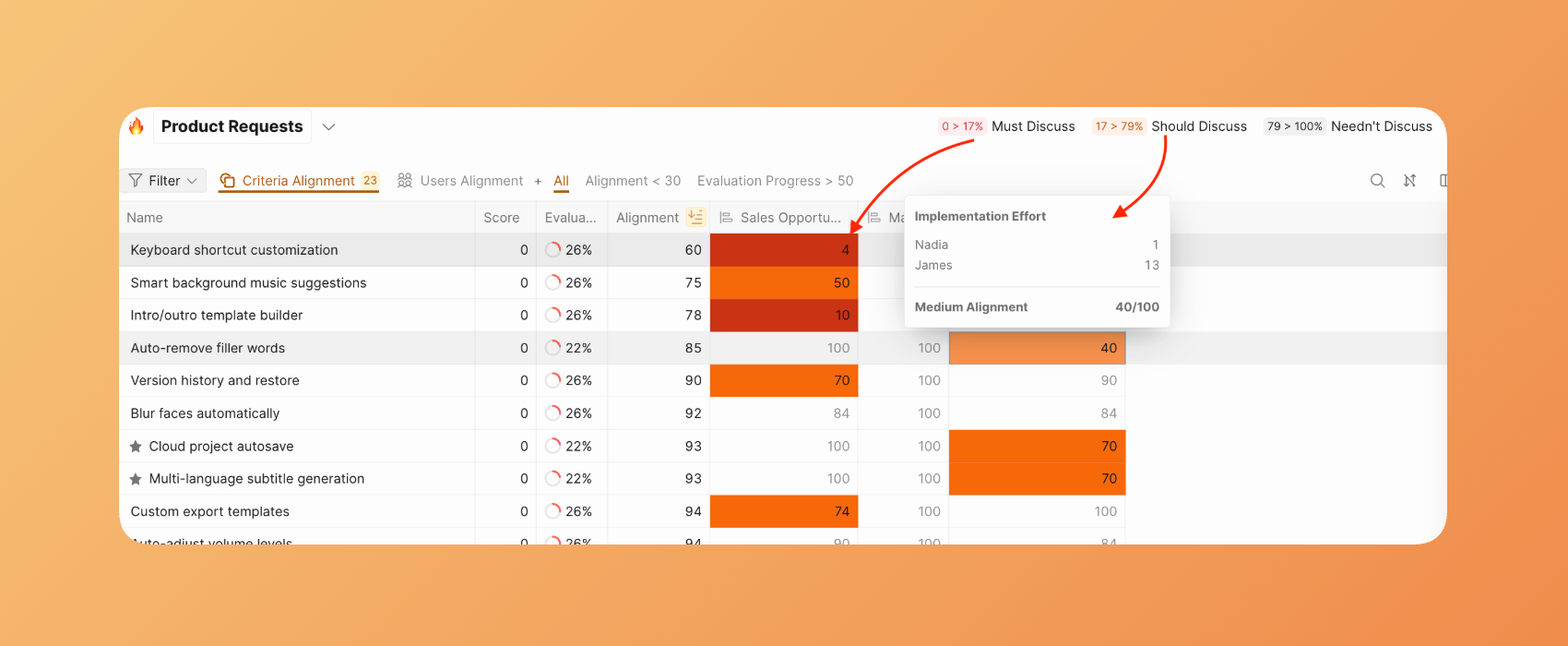
Mehr erfahren über Übereinstimmungs-Reports.
Task Tracker Integration
Ducalis synchronisiert bidirektional mit beliebten Task Trackern:
| Richtung | Was synchronisiert wird |
|---|---|
| Task Tracker → Ducalis | Vorgänge, die deinem Filter entsprechen, erscheinen automatisch zur Priorisierung |
| Ducalis → Task Tracker | Prioritätswerte, Rankings und Links synchronisieren zurück zu benutzerdefinierten Feldern |
Änderungen synchronisieren in Echtzeit — kein manueller Import oder Export erforderlich.
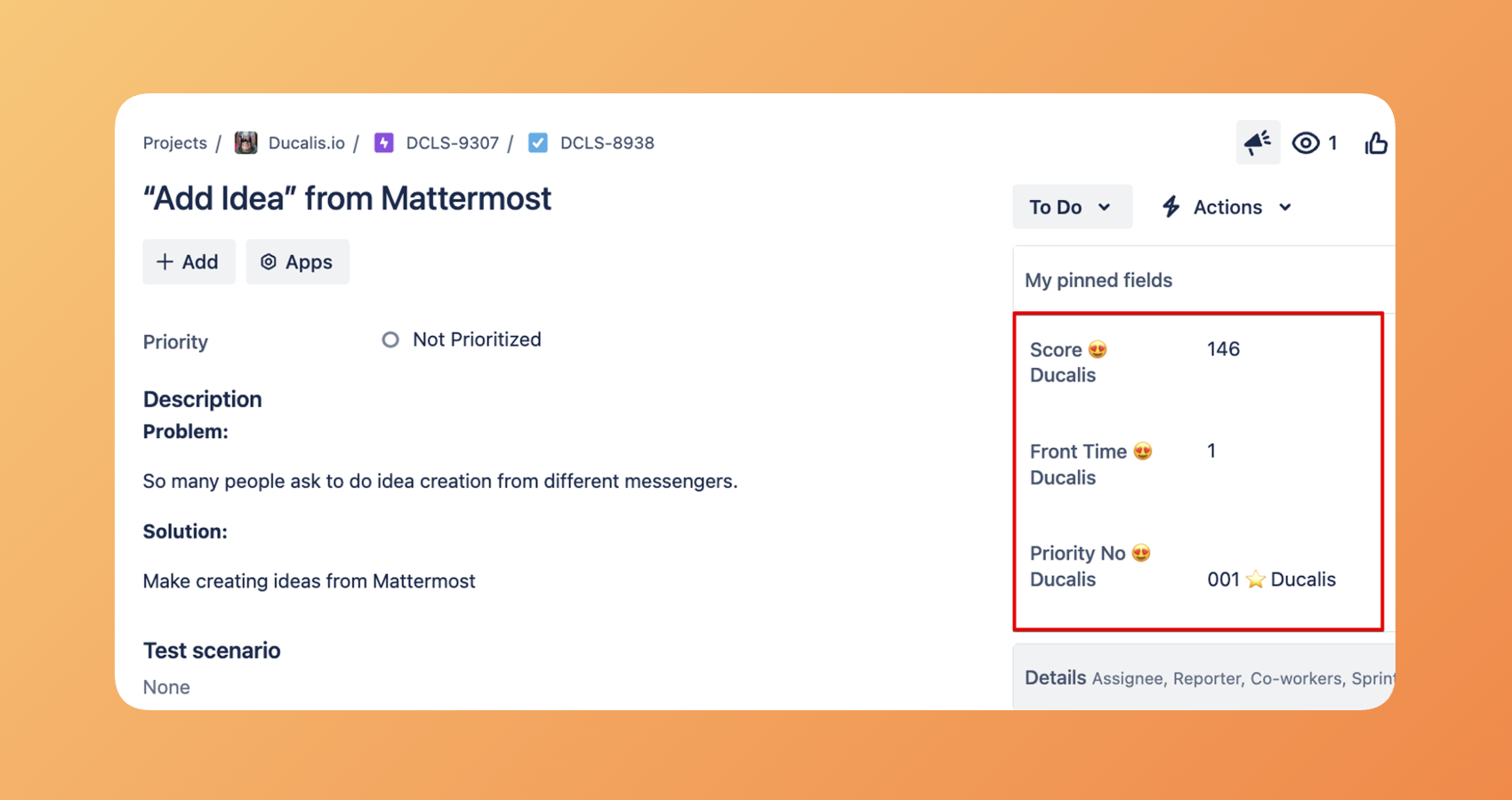
Wähle den Tracker, den du nutzt.
Report Boards
Aggregiere Prioritäten von mehreren Boards in einer einheitlichen Ansicht:
- Teamübergreifende Sichtbarkeit — Sieh Top-Prioritäten über alle Produktbereiche hinweg
- Mehrere Frameworks — Verschiedene Teams können verschiedene Kriterien verwenden, während sie zu einer gemeinsamen Prioritätenliste beitragen
- Enterprise-Rollup — Kombiniere Feature-Anfragen, Bugs, Experimente und technische Schulden in einer einzigen geordneten Ansicht
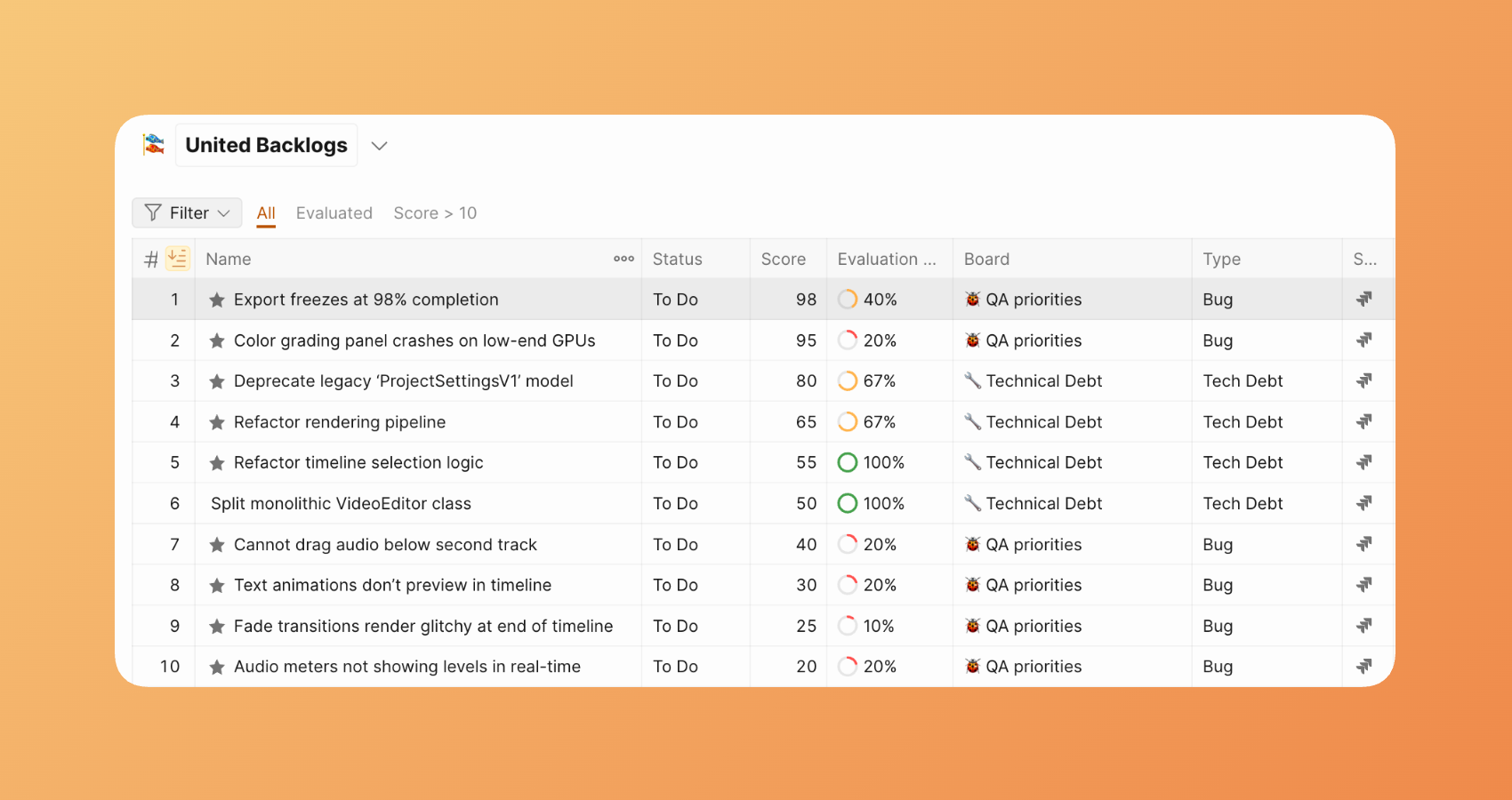
Mehr erfahren über Report-Boards.
Matrix
Die Matrix-Seite zeigt deine Vorgänge in einem Wert-vs-Aufwand-Priorisierungsraster an und hilft dir, Top-Prioritäten mit der Eisenhower-Methode zu identifizieren.
Die Matrix teilt sich in vier Quadranten, die Vorgänge nach Priorität kategorisieren:
-
Erster Quadrant — Hoher Wert, Niedriger Aufwand: Vorgänge, die hohen ROI mit minimalen Ressourcen und Zeit liefern.
-
Zweiter Quadrant — Hoher Wert, Hoher Aufwand: Vorgänge, die hohen ROI liefern, aber erhebliche Ressourcen und Zeit erfordern.
-
Dritter Quadrant — Niedriger Wert, Niedriger Aufwand: Vorgänge mit niedrigem ROI, die minimale Ressourcen und Zeit erfordern.
-
Vierter Quadrant — Niedriger Wert, Hoher Aufwand: Vorgänge mit niedrigem ROI, die erhebliche Ressourcen und Zeit erfordern.
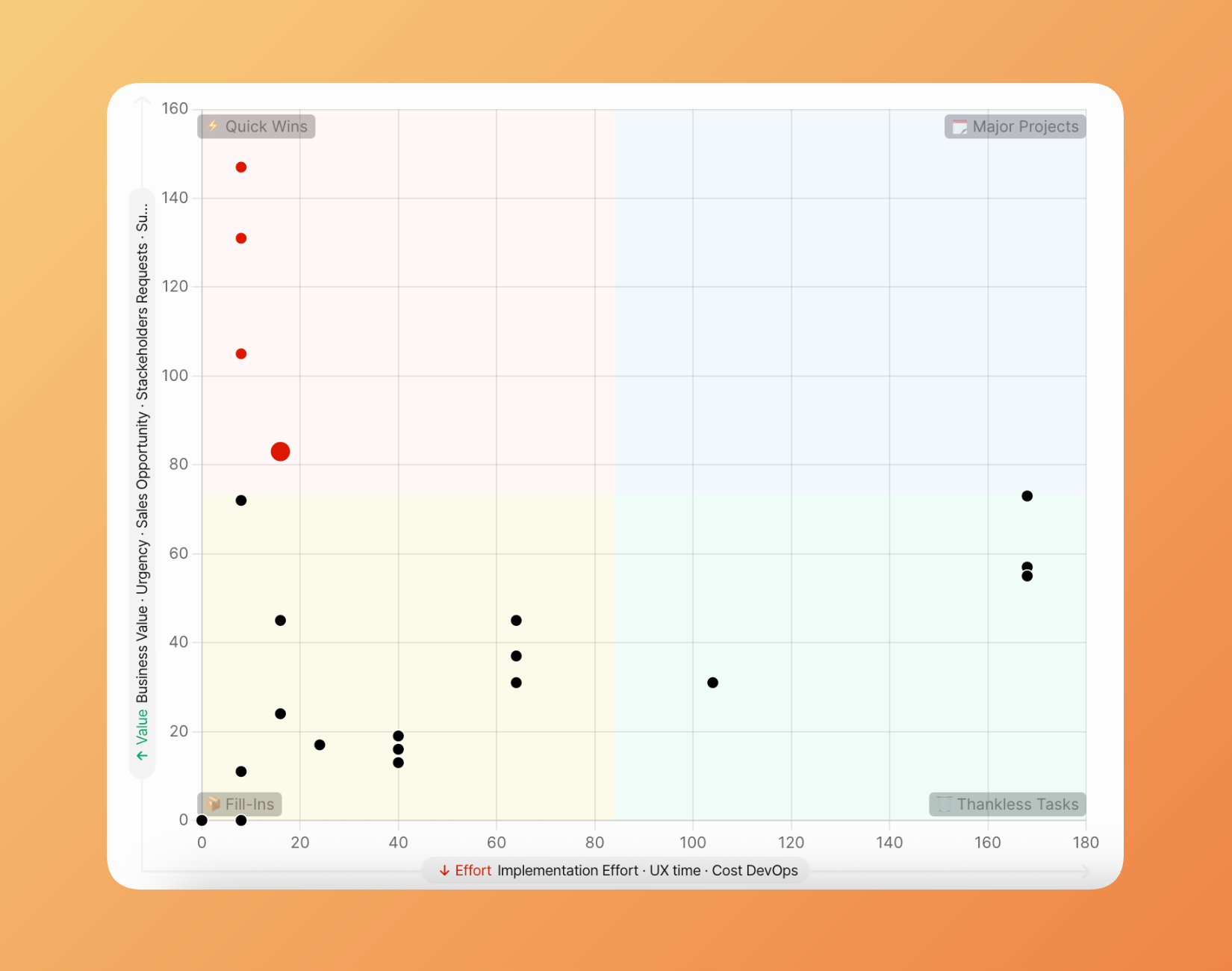
Mehr erfahren über Matrix-Report.
Wie Priorisierung fließt
Modul 3: Release-Kommunikation
Was du bekommst
Schließe die Feedback-Schleife automatisch. Wenn du ein Feature auslieferst, das Kunden angefragt haben, erfahren sie davon — ohne dass dein Team individuelle E-Mails schreibt.
Automatisierte Release Notes
Generiere Release Notes automatisch basierend auf ausgelieferter Arbeit:
- Status-getriebene Automation — Wenn ein Task Tracker Vorgang zu „Erledigt" wechselt, werden die Release Notes generiert
- KI-unterstützte Erstellung — Ducalis erstellt die Ankündigung aus Vorgang-Details und Kommentaren
- Vorlagen-Konsistenz — Alle Notizen folgen deinem definierten Format und Ton
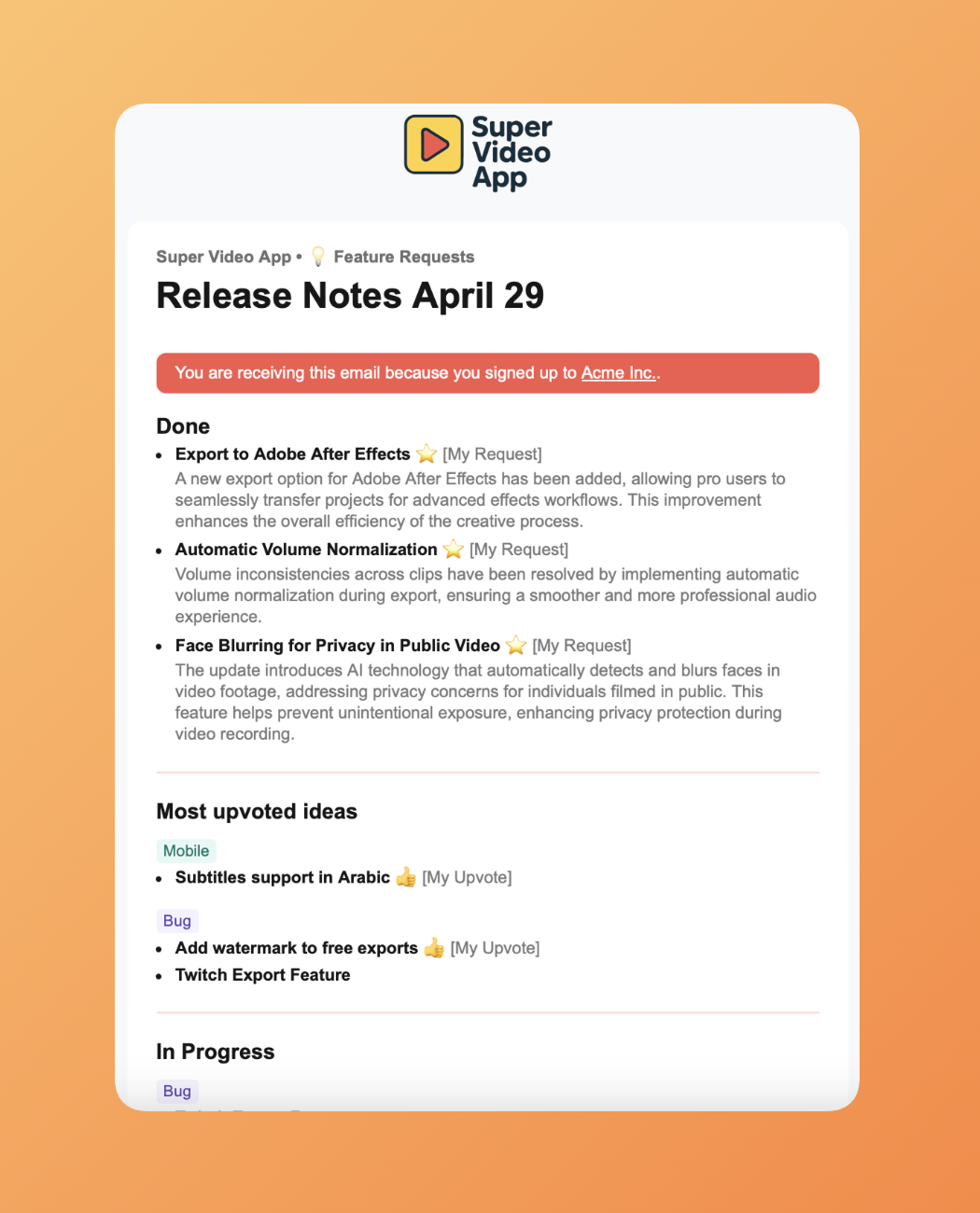
Mehr erfahren über Release Notes.
Personalisierte Benachrichtigungen
Abstimmende erhalten Updates, die für das relevant sind, was sie angefragt haben:
- „Du hast gefragt, wir haben geliefert" — Kunden, die abgestimmt haben, sehen genau, was basierend auf ihrem Feedback ausgeliefert wurde
- Abonnenten-spezifische Updates — Verschiedene Kundensegmente erhalten verschiedene Ankündigungen
- Multi-Channel-Zustellung — Benachrichtigungen per E-Mail, in-App oder eingebettetem Widget
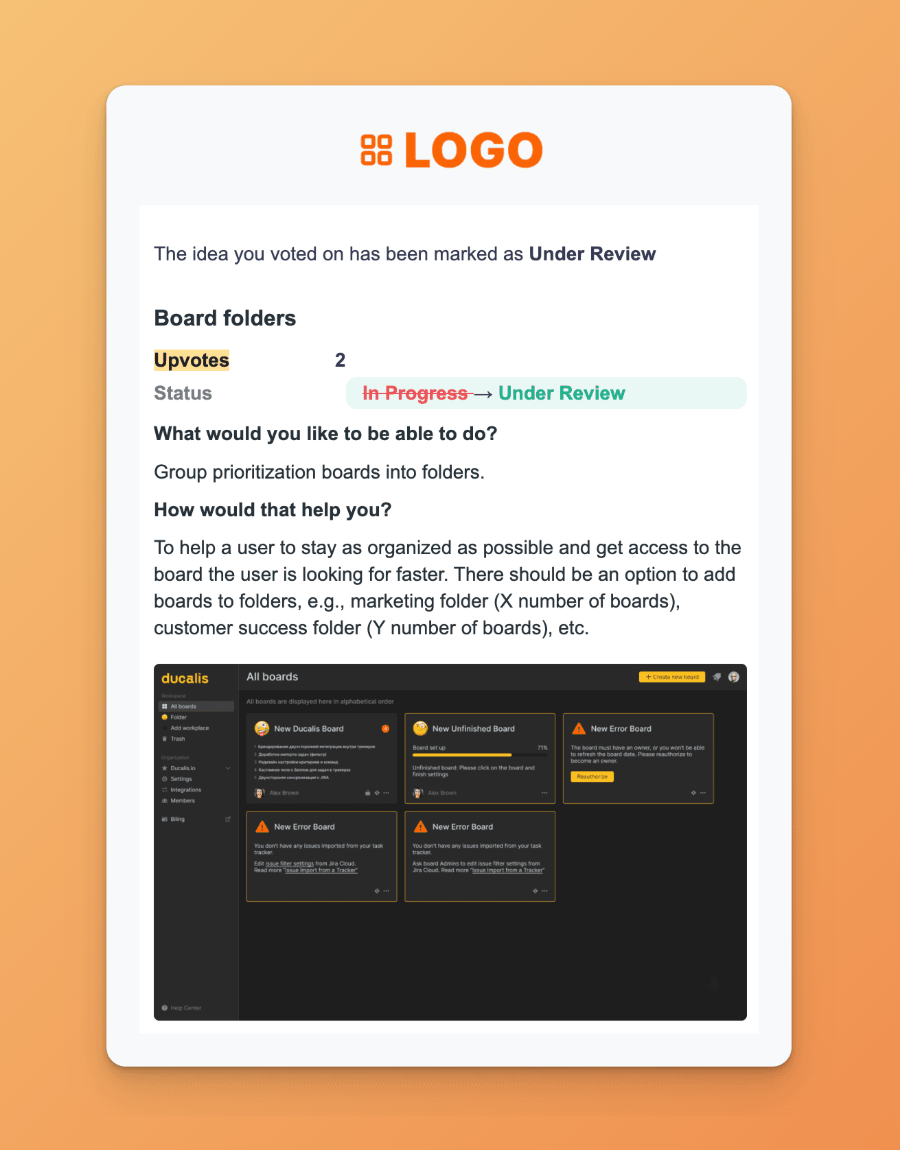
Erfahre, welche Benachrichtigungen deine Abstimmenden erhalten.
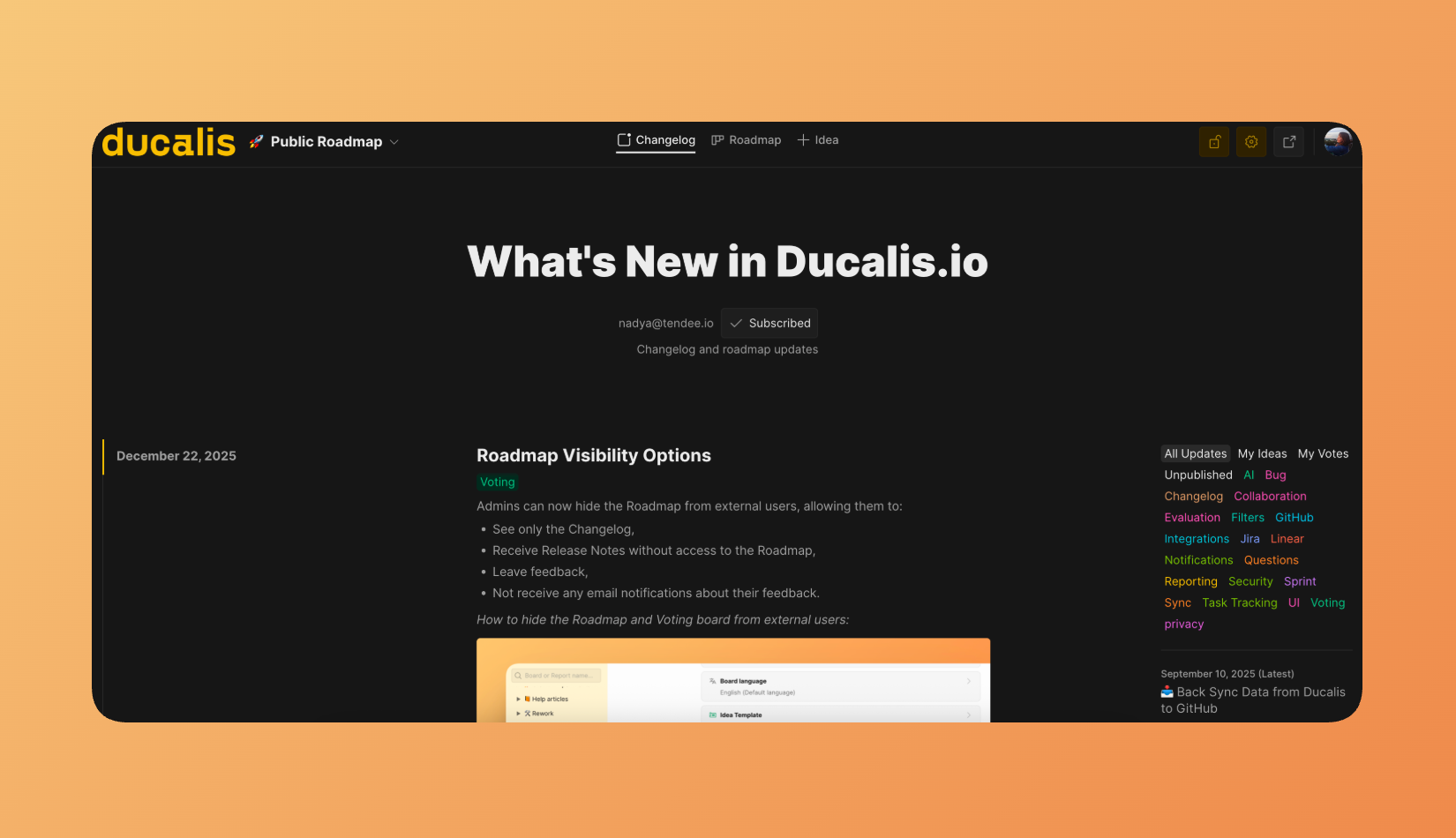
Öffentlicher Changelog
Teile Fortschritt öffentlich mit einer gebrandeten Changelog-Seite:
- Individuelles Branding — Passe dich dem Design deines Produkts an
- Einbettbares Widget — Füge den Changelog in dein Produkt ein
- Kundenabonnement — Nutzer abonnieren, um automatisch Updates zu erhalten
Mehr erfahren über Changelog-Seite.
Status-Automation
Verbinde Ducalis mit deiner Deployment-Pipeline:
| Auslöser | Aktion |
|---|---|
| Task Tracker Statusänderung | Ideen-Status aktualisiert sich automatisch |
| CI/CD Webhook | Release Notes werden veröffentlicht, wenn Code in Produktion deployt wird |
| Manueller Override | Bearbeite oder verzögere jede automatisierte Benachrichtigung |
Mehr erfahren über Status-Automation.
Wie Kommunikation fließt
Wie alles zusammenhängt
Die drei Module bilden eine kontinuierliche Feedback-Schleife:
- Sammeln — Kunden reichen Ideen über Voting Boards oder Support-Kanäle ein
- Priorisieren — Dein Team bewertet Ideen gemeinsam mit internen Plänen unter Verwendung gemeinsamer Kriterien
- Bauen — Top-Prioritäten synchronisieren zu deinem Task Tracker und gehen in die Entwicklung
- Kommunizieren — Abgeschlossene Features lösen Benachrichtigungen an alle aus, die sie angefragt haben
- Wiederholen — Kunden sehen ihre Wirkung, was Vertrauen aufbaut und zu mehr Feedback ermutigt
Ergebnisse aus der Praxis
Organisationen, die Ducalis nutzen, berichten von messbaren Verbesserungen bei Entscheidungsgeschwindigkeit und Produktlieferung.
Enterprise-Einzelhandel Fallstudie
Ein großes Einzelhandelsunternehmen mit mehreren Produktteams implementierte Ducalis, um Tabellenkalkulations-basierte Priorisierung zu ersetzen:
| Metrik | Vorher | Nachher | Verbesserung |
|---|---|---|---|
| Jährliche Planungszeit | 18 Wochen | 2 Wochen | 9x schneller |
| Lead Time | Baseline | -40% | 40% Reduktion |
| Lieferzyklus | Baseline | -50% | 50% schneller |
| Feature-Wirkung | Baseline | 5x | 5x wirkungsvoller |
Hauptergebnisse:
- Beseitigung von Backlog-Items mit niedrigem Wert, nachdem Team-Bewertungen zeigten, dass sie nicht tatsächlich benötigt wurden
- Reduzierte Meeting-Zeit durch Ersetzen synchroner Diskussionen durch asynchrone Bewertung
- Erhöhte Kundenzufriedenheit durch Schließen der Feedback-Schleife bei ausgelieferten Features
Erste Schritte
Erhalte Wert von Ducalis in drei Phasen:
Phase 1: Feedback sammeln
- Erstelle ein Voting Board für dein Produkt
- Bette das Widget in dein Produkt ein oder teile den Board-Link mit Kunden
- Verbinde deine Support-Kanäle (Messenger, E-Mail)
Hier ist die Schritt-für-Schritt-Anleitung zum Sammeln von Feedback.
Phase 2: Deinen Backlog priorisieren
- Verbinde deinen Task Tracker
- Definiere deine Priorisierungskriterien
- Lade dein Team ein, Top-Vorgänge zu bewerten
Hier ist die Schritt-für-Schritt-Anleitung zur Backlog-Priorisierung.
Phase 3: Kommunikation automatisieren
- Konfiguriere Status-Automationsregeln
- Richte Release Notes Templates ein
- Aktiviere Kundenbenachrichtigungen
Hier ist die Schritt-für-Schritt-Anleitung zum Erstellen von Release Notes.