Visão geral do produto
Ducalis é uma plataforma unificada de tomada de decisões de produto que conecta o feedback dos clientes, a priorização da equipa e a comunicação com as partes interessadas. Tome melhores decisões de produto mais rapidamente, com total transparência e envolvimento do cliente.
O que é Ducalis?
As equipas de produto enfrentam um desafio comum: equilibrar prioridades concorrentes de clientes, partes interessadas internas e objetivos de negócio. Ducalis resolve isto ao fornecer um sistema transparente e baseado em dados para decidir o que construir a seguir.
A plataforma consiste em três módulos interligados:
- Feedback & Voting — Recolha e organize ideias de clientes e equipas internas
- Prioritization — Pontue, avalie e alinhe a sua equipa sobre o que construir a seguir
- Release Communication — Mantenha as partes interessadas informadas com atualizações automatizadas
Quem o utiliza
Ducalis serve diferentes funções em toda a sua organização:
| Função | Utilização principal |
|---|---|
| Product managers | Priorizar backlog, recolher feedback de clientes, comunicar roadmap |
| Equipas de desenvolvimento | Avaliar esforço técnico, ver justificação de prioridades, acompanhar o que é lançado |
| Customer success | Submeter pedidos de clientes, acompanhar estado de funcionalidades, partilhar atualizações |
| Liderança | Ver prioridades entre equipas, acompanhar métricas de entrega, compreender necessidades dos clientes |
| Equipas de marketing | Ter uma única fonte de verdade para os seus planos, gerir pedidos e processos de produção |
Módulo 1: Feedback & Voting
O que obtém
Capture cada voz do cliente num único lugar. Quer o feedback venha de tickets de suporte, conversas de messenger, emails ou do seu próprio produto, Ducalis consolida tudo num único backlog organizado de ideias.
Voting Boards
Voting Boards são páginas onde clientes e membros da equipa submetem e votam em ideias.
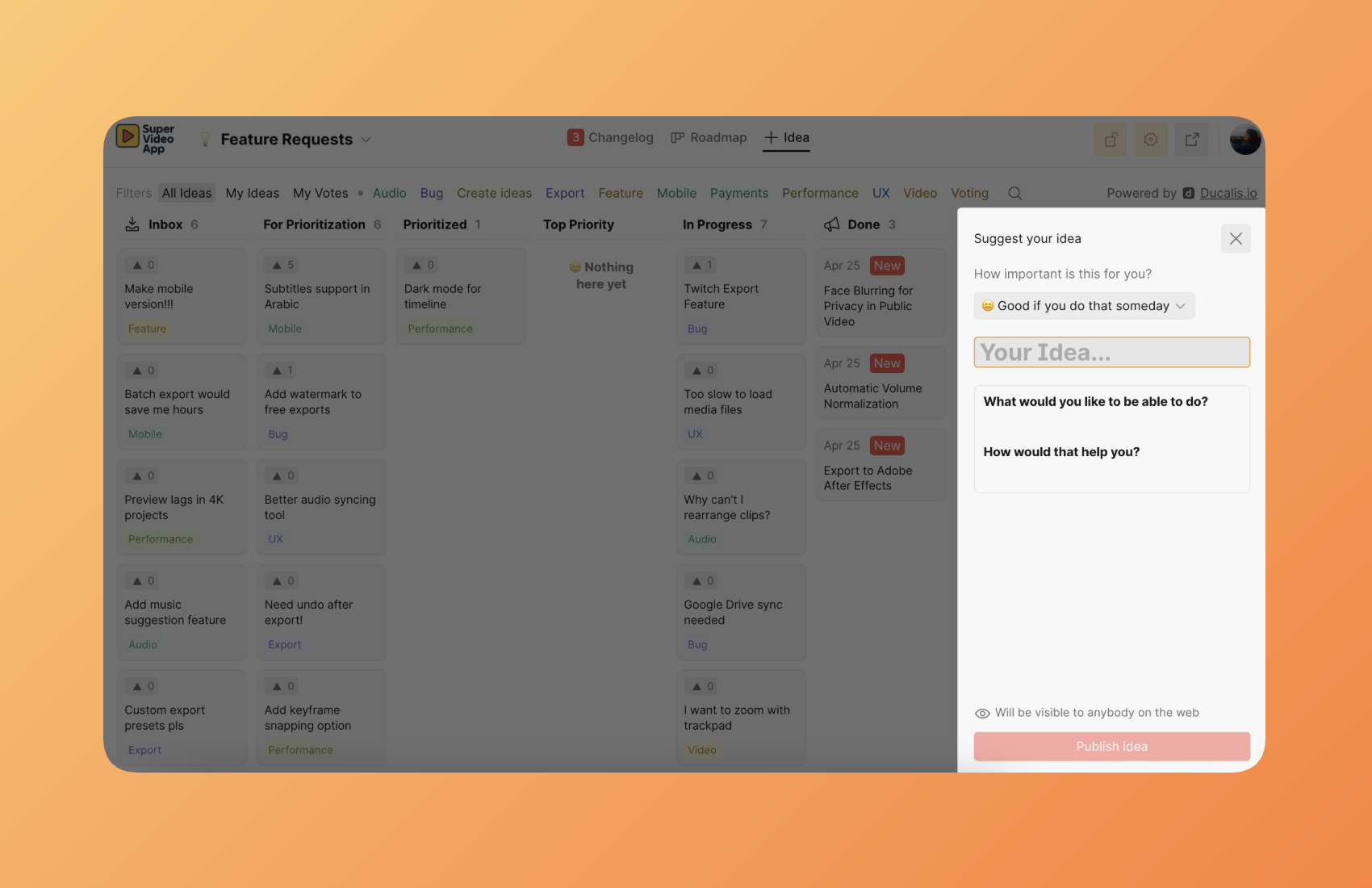
A abordagem mais poderosa: Incorporar o Voting Board diretamente no seu produto.
Quando incorpora Ducalis como um widget dentro da sua aplicação, torna-se numa extensão invisível do seu produto. Os utilizadores submetem feedback, votam em ideias e acompanham o estado das funcionalidades sem nunca sair da sua interface. Não há links externos, não há mudança de contexto, não há atrito — a recolha de feedback acontece naturalmente como parte da experiência do produto.
Isto remove as barreiras entre o seu produto e a recolha de feedback. Os clientes não pensam "Preciso de ir a um portal de feedback". Simplesmente interagem com o que parece ser uma funcionalidade nativa do seu produto.
Opções de implementação:
- Widget incorporado (recomendado) — Torne Ducalis numa extensão invisível do seu produto
- Página autónoma — Aloje um portal de feedback dedicado com a sua marca personalizada
- Acesso público ou privado — Controle quem pode ver e submeter ideias
- Integração SSO — Autentique utilizadores através do seu fornecedor de identidade existente
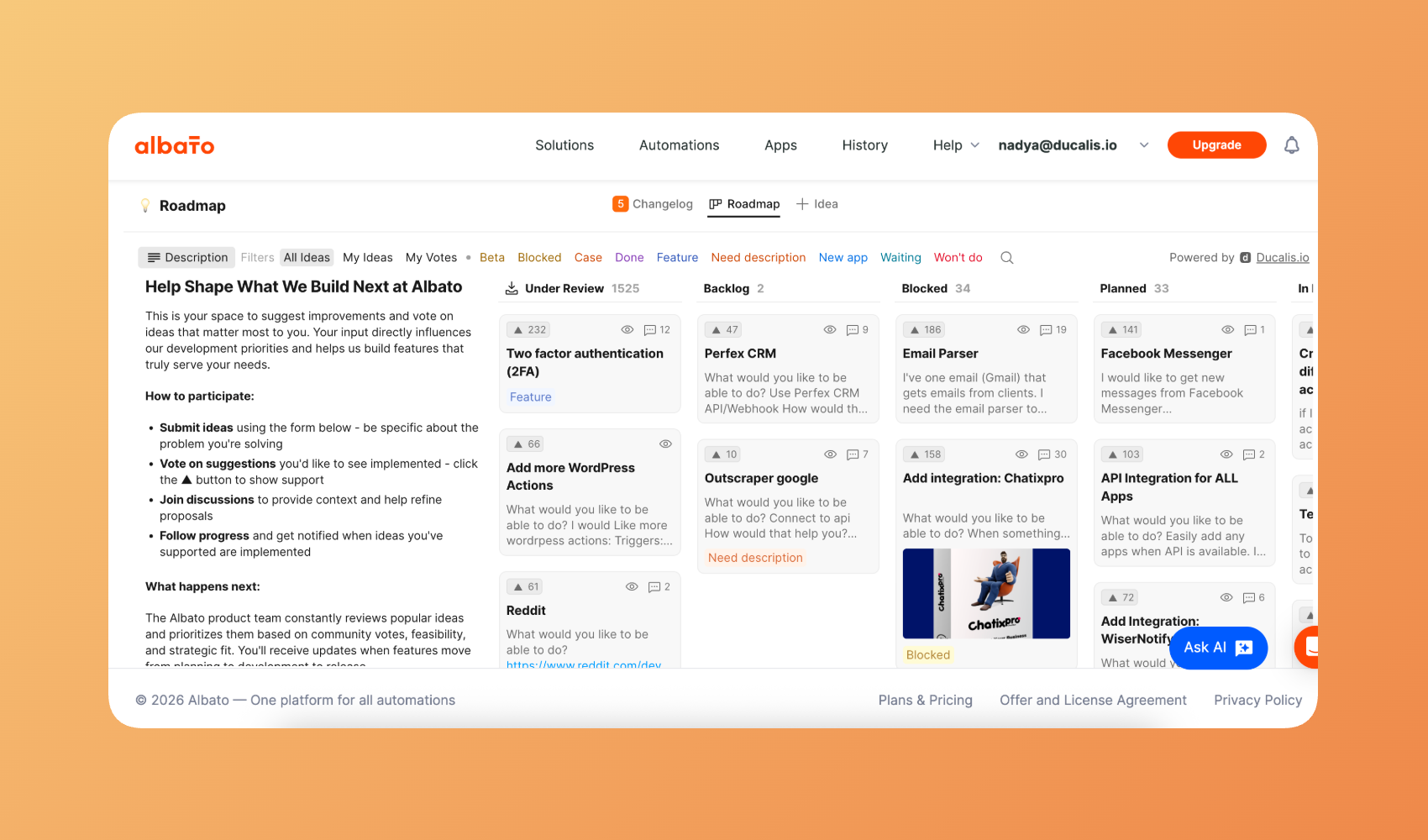
Saiba mais sobre o Voting SDK.
Captura de ideias multicanal
Recolha ideias de onde quer que os seus clientes comuniquem:
| Canal | Como funciona |
|---|---|
| Messenger bots | Reencaminhe mensagens do Telegram, Slack, Mattermost ou Discord para criar ideias automaticamente |
| Reencaminhamento de email | Reencaminhe emails de clientes para convertê-los em ideias rastreáveis |
| Widget incorporado | Adicione um formulário de feedback dentro da interface do seu produto |
| Submissões internas | Membros da equipa submetem ideias em nome de clientes ou a partir de discussões internas |
| Backlog do Task Tracker | Crie feedback a partir do seu backlog existente |
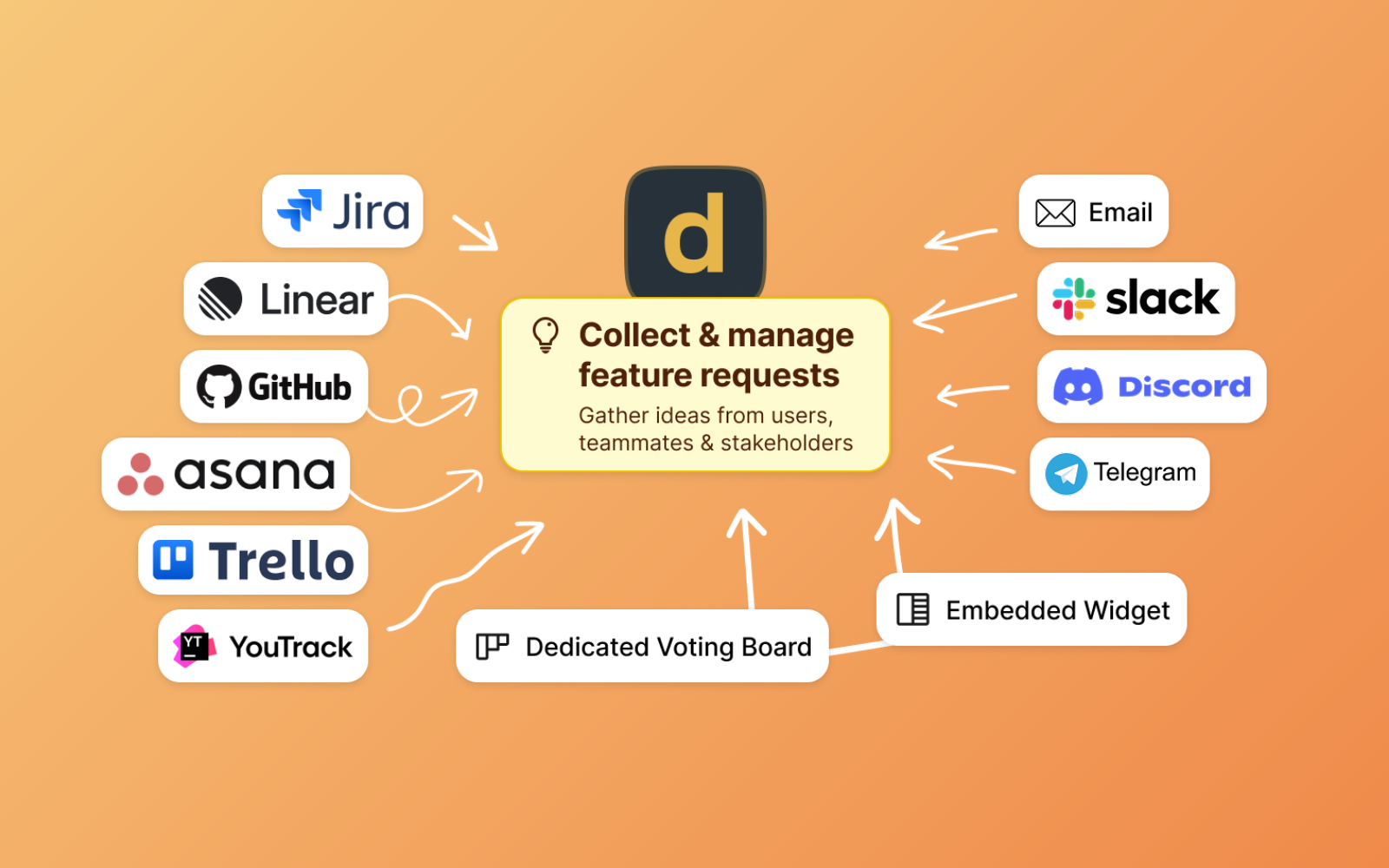
Saiba mais sobre recolher feedback de diferentes fontes.
Processamento com AI
Ducalis usa AI para simplificar a gestão de ideias:
- Transcrição de mensagens de voz — Converta mensagens de áudio em ideias de texto
- Modelação de ideias — Reescreva feedback em bruto num formato consistente baseado no seu modelo
- Deteção de duplicados — Identifique e combine ideias semelhantes para consolidar votos

Saiba mais sobre a AI de Ducalis.
Como o feedback flui
Módulo 2: Prioritization
O que obtém
Substitua opiniões por decisões de equipa baseadas em dados. Em vez da voz mais alta ganhar, Ducalis captura a avaliação de todos e revela onde a sua equipa concorda — e onde precisa de discutir.
Critérios personalizáveis
Defina os seus próprios critérios de pontuação para corresponder à forma como a sua organização toma decisões:
- Critérios de valor — Impacto na ativação, retenção, receita ou segmentos de clientes
- Critérios de esforço — Tempo de backend, tempo de frontend, esforço de design ou quaisquer fatores personalizados
- Importância ponderada — Atribua pesos diferentes aos critérios que importam mais
- Atribuição baseada em função — Engenheiros pontuam esforço, PMs pontuam valor de negócio
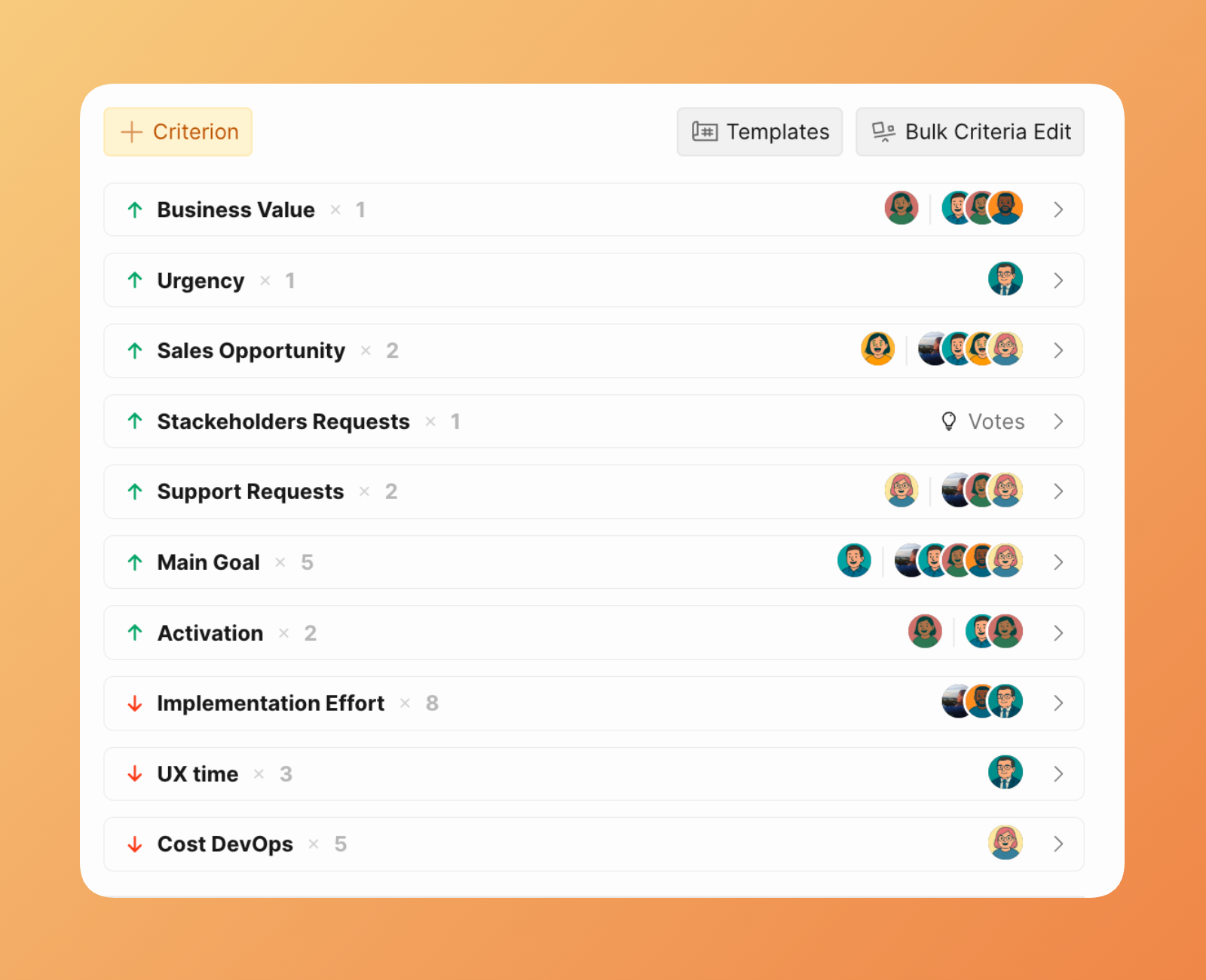
Saiba mais sobre definições de critérios e modelos.
Evaluation Poker
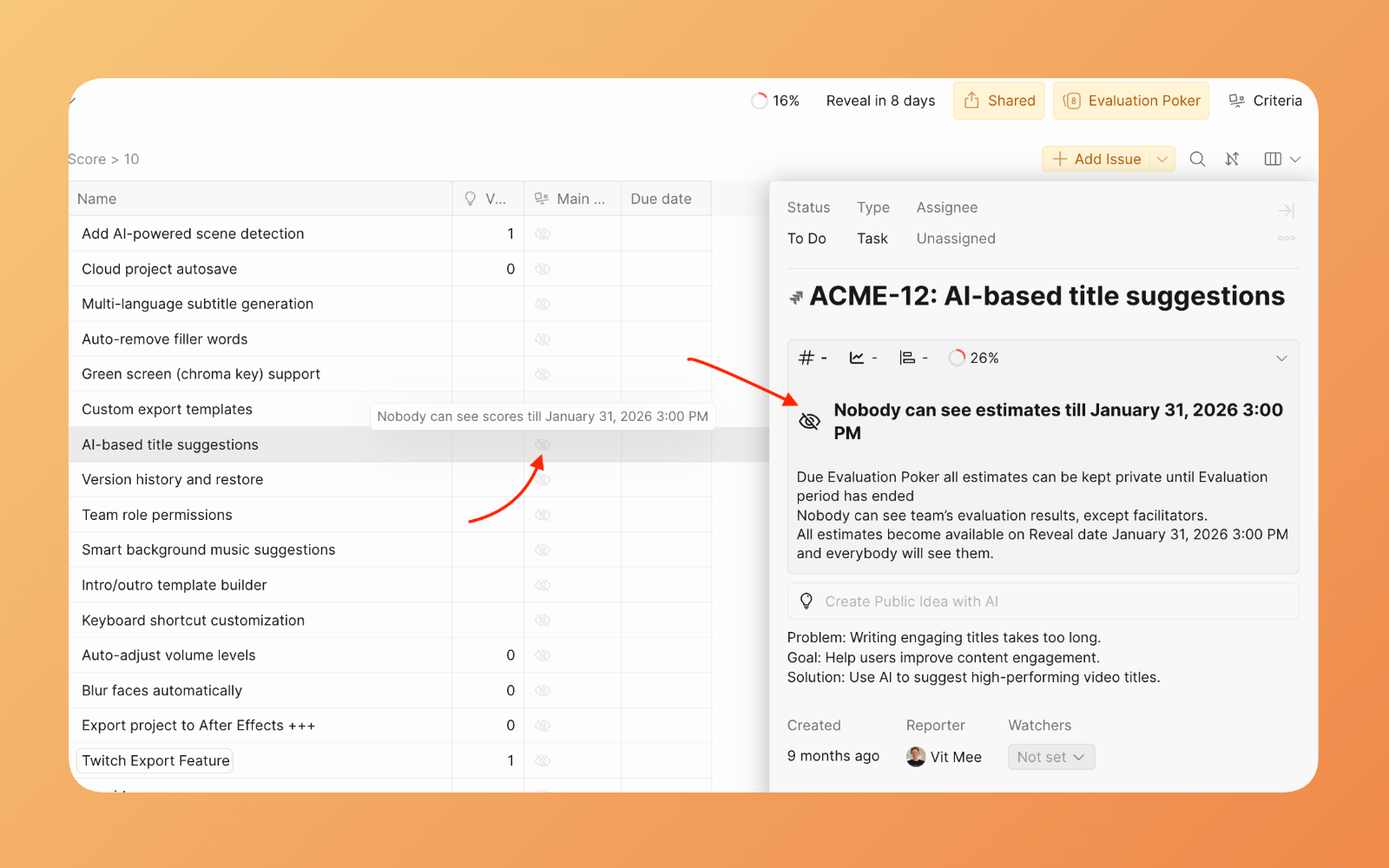
Ducalis usa uma abordagem de "votação secreta" inspirada no Planning Poker:
- As pontuações ficam ocultas — Os membros da equipa avaliam itens sem ver as pontuações dos outros
- Revelação em conjunto — Assim que todos pontuam, revele todas as avaliações simultaneamente
- Discutir diferenças — Quando as pontuações divergem significativamente, discuta e chegue a consenso
Isto previne o viés de ancoragem onde opiniões iniciais influenciam todos os outros.
Saiba mais sobre Sprint Planning.
Acompanhamento de alinhamento
O indicador de alinhamento mostra onde a sua equipa concorda e onde é necessária discussão:
- Alinhamento alto — A equipa concorda sobre a prioridade; prossiga com confiança
- Alinhamento baixo — Existe desacordo significativo; discuta antes de decidir
- Alinhamento médio — Bom discutir, mas não crítico
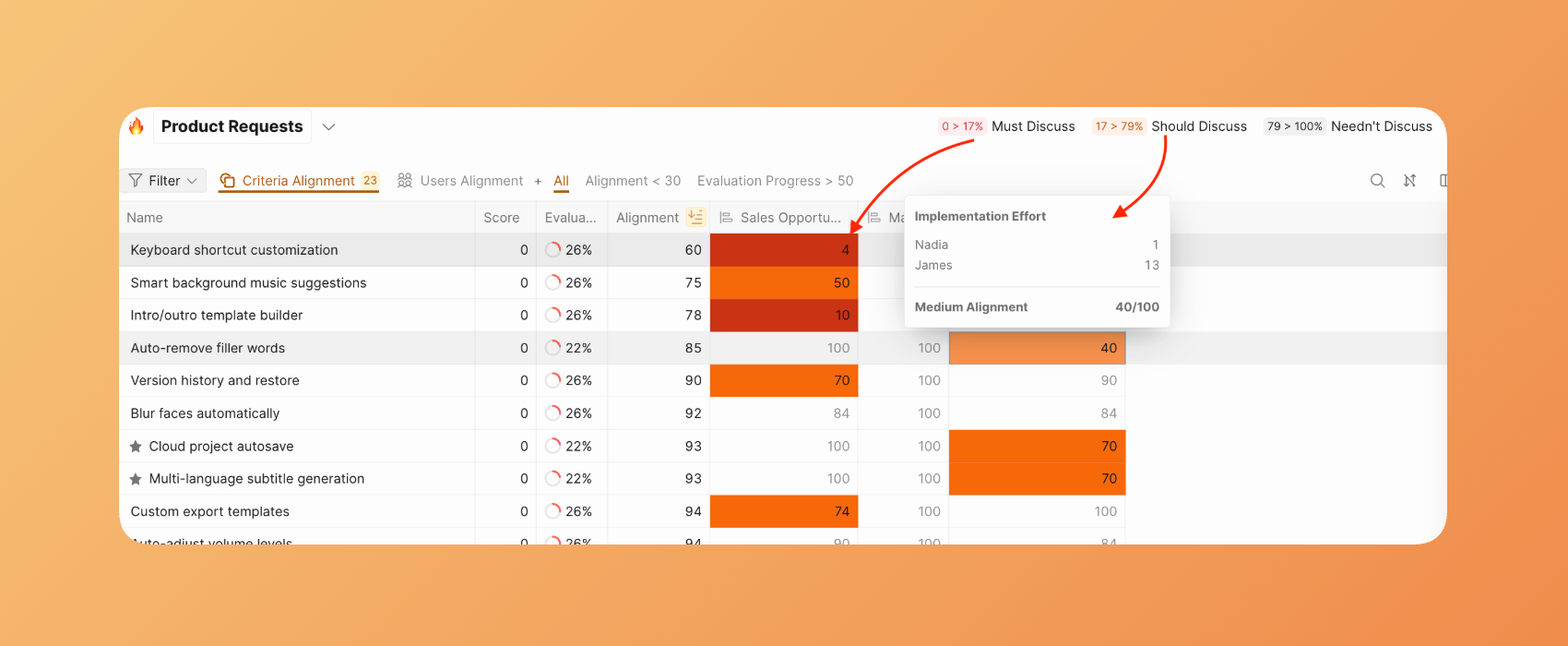
Saiba mais sobre relatórios de Alignment.
Integração com task tracker
Ducalis sincroniza bidirecionalmente com gestores de tarefas populares:
| Direção | O que sincroniza |
|---|---|
| Task Tracker → Ducalis | Itens que correspondem ao seu filtro aparecem automaticamente para priorização |
| Ducalis → Task Tracker | Pontuações de prioridade, rankings e links sincronizam de volta para campos personalizados |
As alterações sincronizam em tempo real — não é necessária importação ou exportação manual.
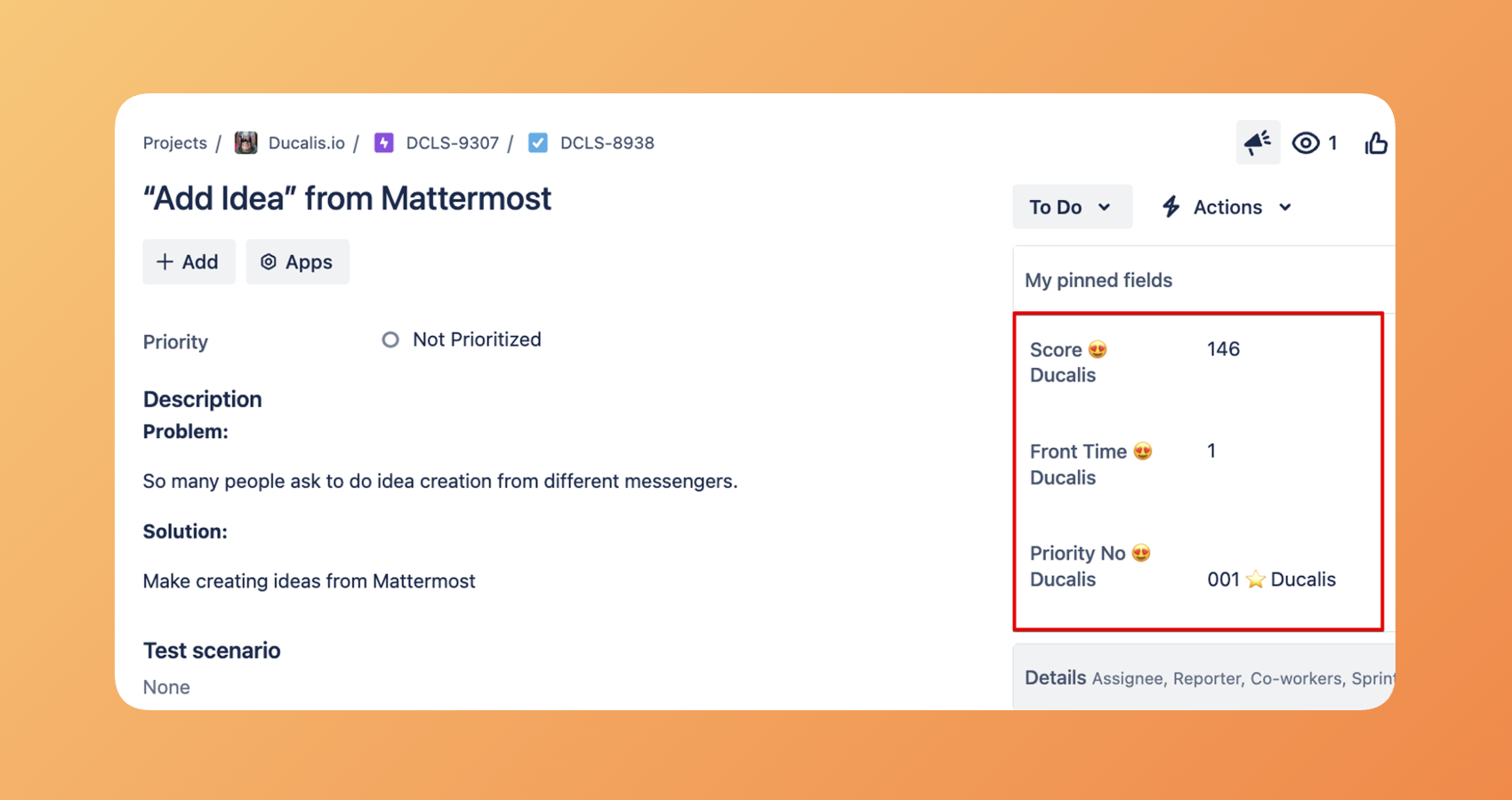
Escolha o gestor de tarefas que utiliza.
Report Boards
Agregue prioridades de múltiplos Boards numa vista unificada:
- Visibilidade entre equipas — Veja as principais prioridades em todas as áreas de produto
- Múltiplas frameworks — Diferentes equipas podem usar critérios diferentes enquanto contribuem para uma lista de prioridades partilhada
- Consolidação empresarial — Combine pedidos de funcionalidades, bugs, experiências e dívida técnica numa única vista classificada
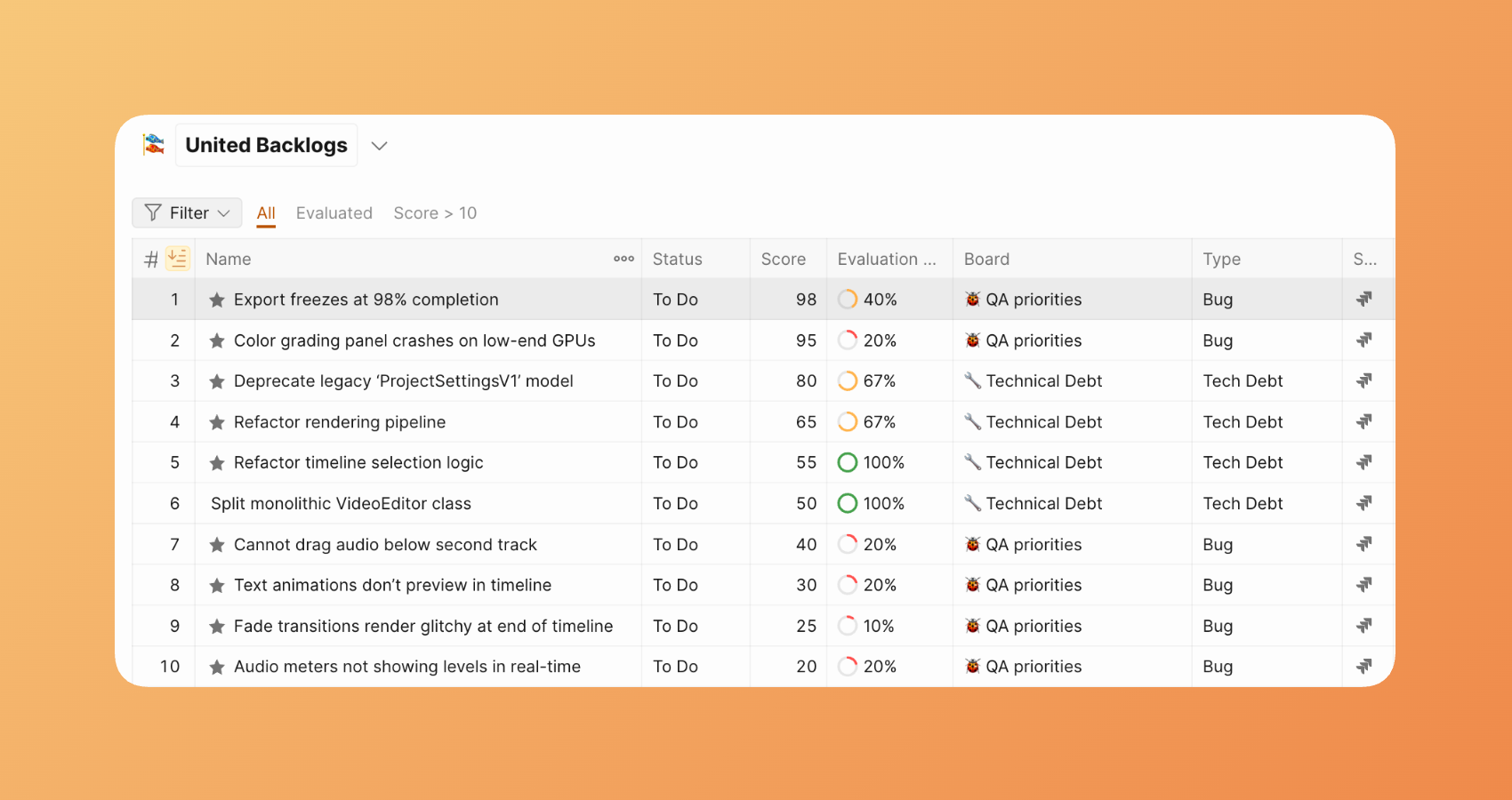
Saiba mais sobre Report-boards.
Matrix
A página Matrix apresenta os seus Issues numa grelha de priorização Valor vs Esforço, ajudando a identificar as principais prioridades usando o método Eisenhower.
A Matrix divide-se em quatro quadrantes que categorizam Issues por prioridade:
-
Primeiro quadrante — Valor Alto, Esforço Baixo: Issues que entregam ROI elevado com recursos e tempo mínimos.
-
Segundo quadrante — Valor Alto, Esforço Alto: Issues que entregam ROI elevado mas requerem recursos e tempo significativos.
-
Terceiro quadrante — Valor Baixo, Esforço Baixo: Issues com ROI baixo que requerem recursos e tempo mínimos.
-
Quarto quadrante — Valor Baixo, Esforço Alto: Issues com ROI baixo que requerem recursos e tempo significativos.
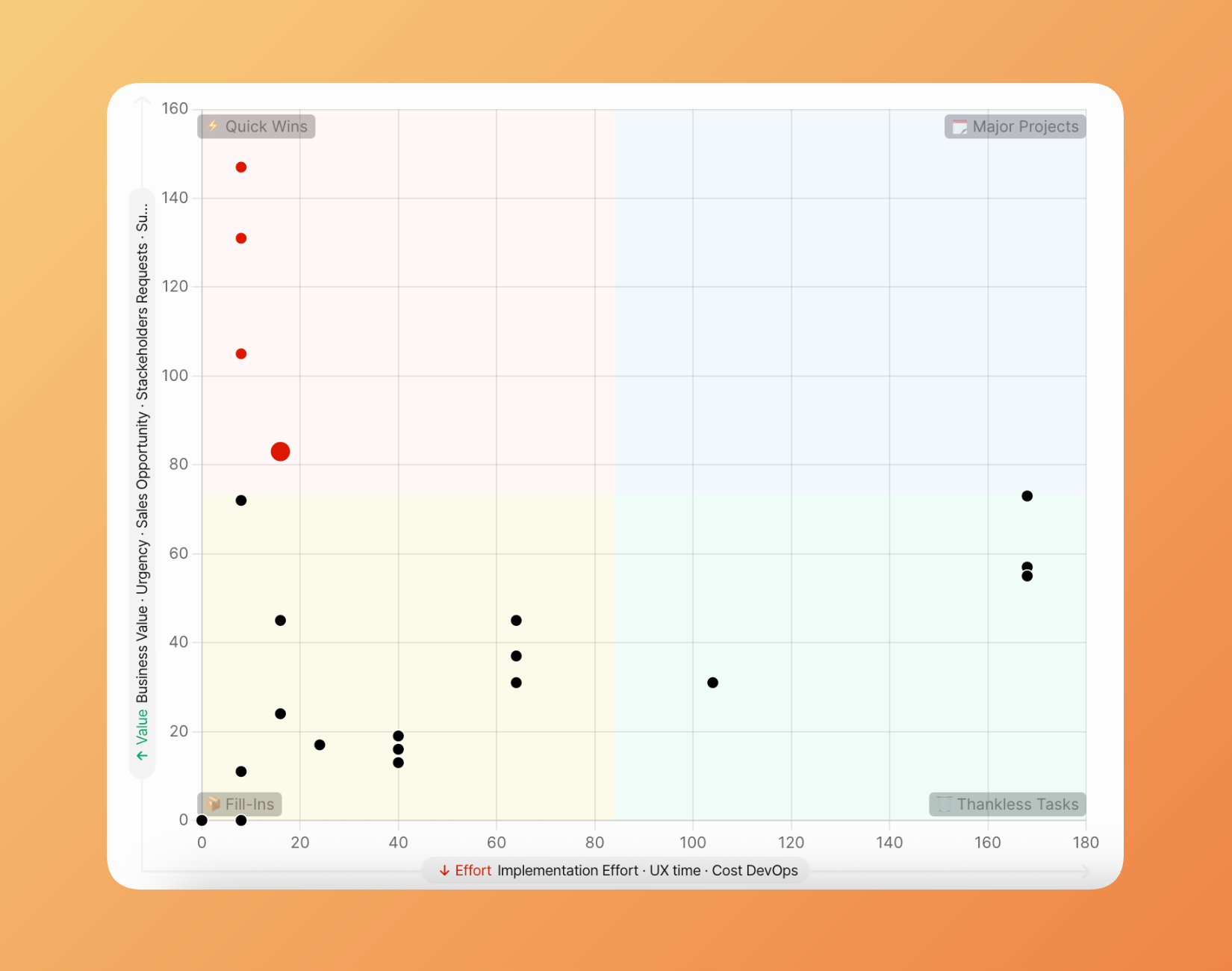
Saiba mais sobre o relatório Matrix.
Como a priorização flui
Módulo 3: Release Communication
O que obtém
Feche automaticamente o ciclo de feedback. Quando lança uma funcionalidade que os clientes pediram, eles ficam a saber — sem a sua equipa escrever emails individuais.
Release notes automatizadas
Gere release notes automaticamente baseadas no trabalho lançado:
- Automação baseada em estado — Quando um item do task tracker passa para "Done", a release note é gerada
- Escrita assistida por AI — Ducalis rascunha o anúncio a partir de detalhes e comentários do item
- Consistência de modelo — Todas as notas seguem o seu formato e tom definidos
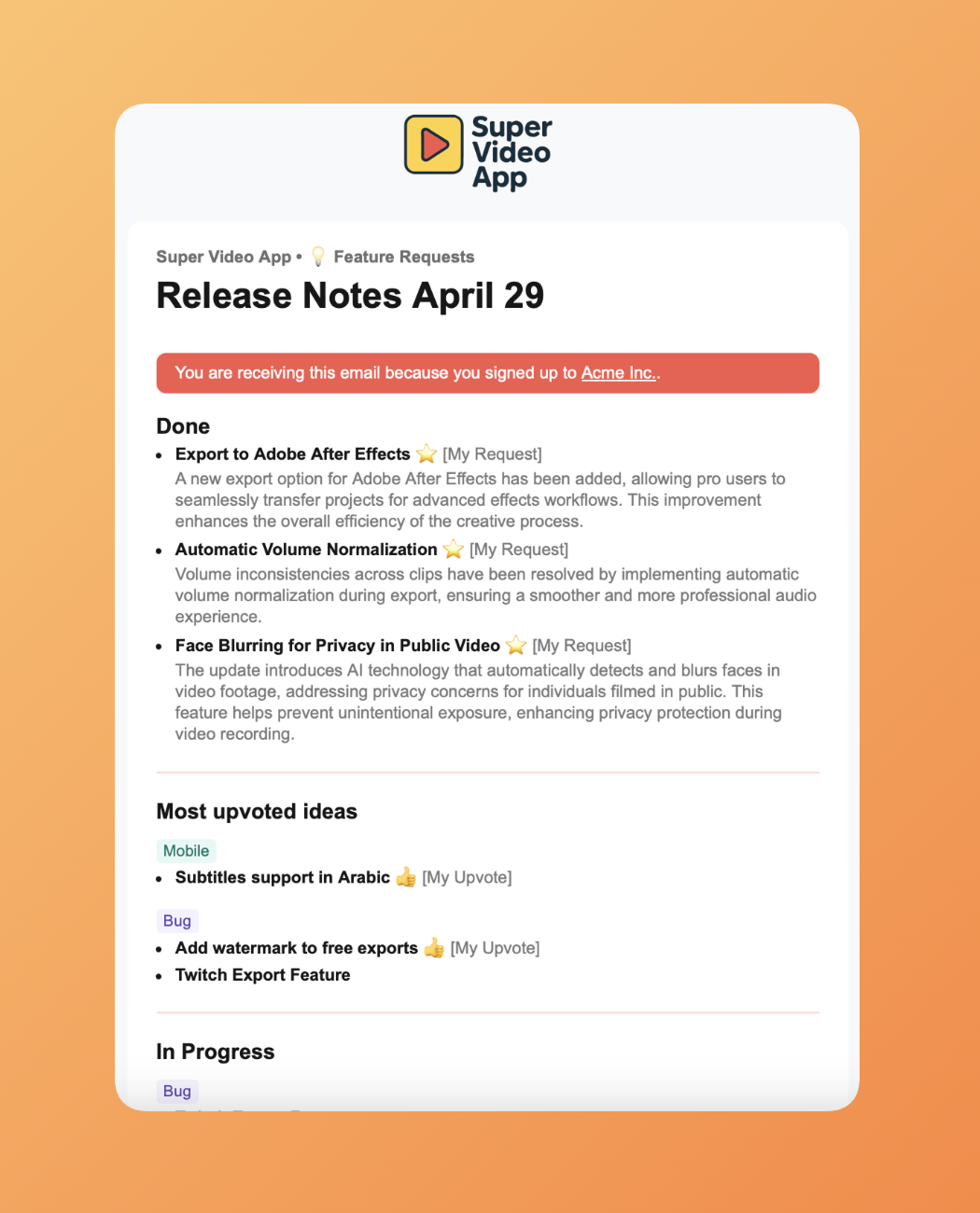
Saiba mais sobre Release Notes.
Notificações personalizadas
Os votantes recebem atualizações relevantes para o que pediram:
- "Pediu, nós entregámos" — Os clientes que votaram veem exatamente o que foi lançado com base no seu feedback
- Atualizações específicas de subscritor — Diferentes segmentos de clientes recebem anúncios diferentes
- Entrega multicanal — Notificações via email, in-app ou widget incorporado
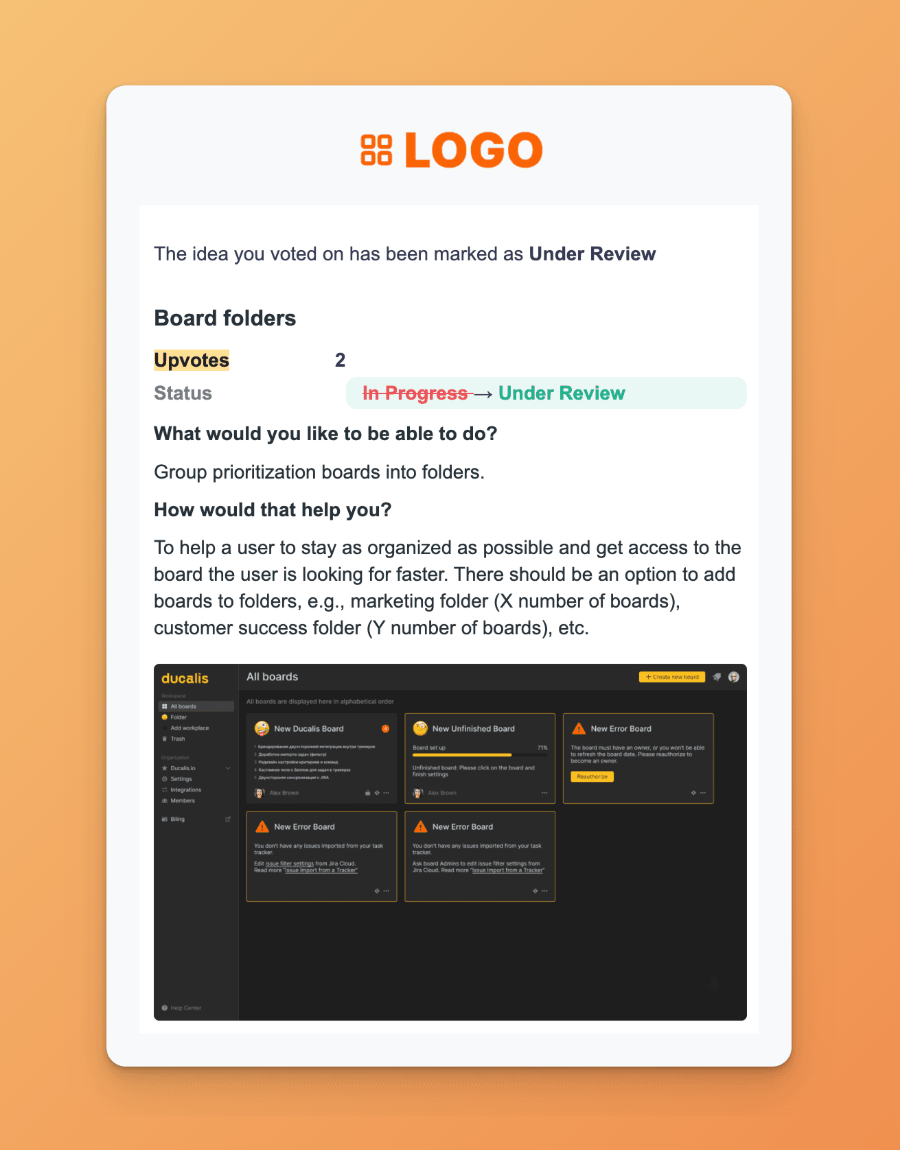
Saiba que notificações os seus votantes recebem.
Changelog público
Partilhe progresso publicamente com uma página de changelog com a sua marca:
- Marca personalizada — Corresponda ao design do seu produto
- Widget incorporável — Adicione o changelog dentro do seu produto
- Subscrição de cliente — Utilizadores subscrevem para receber atualizações automaticamente
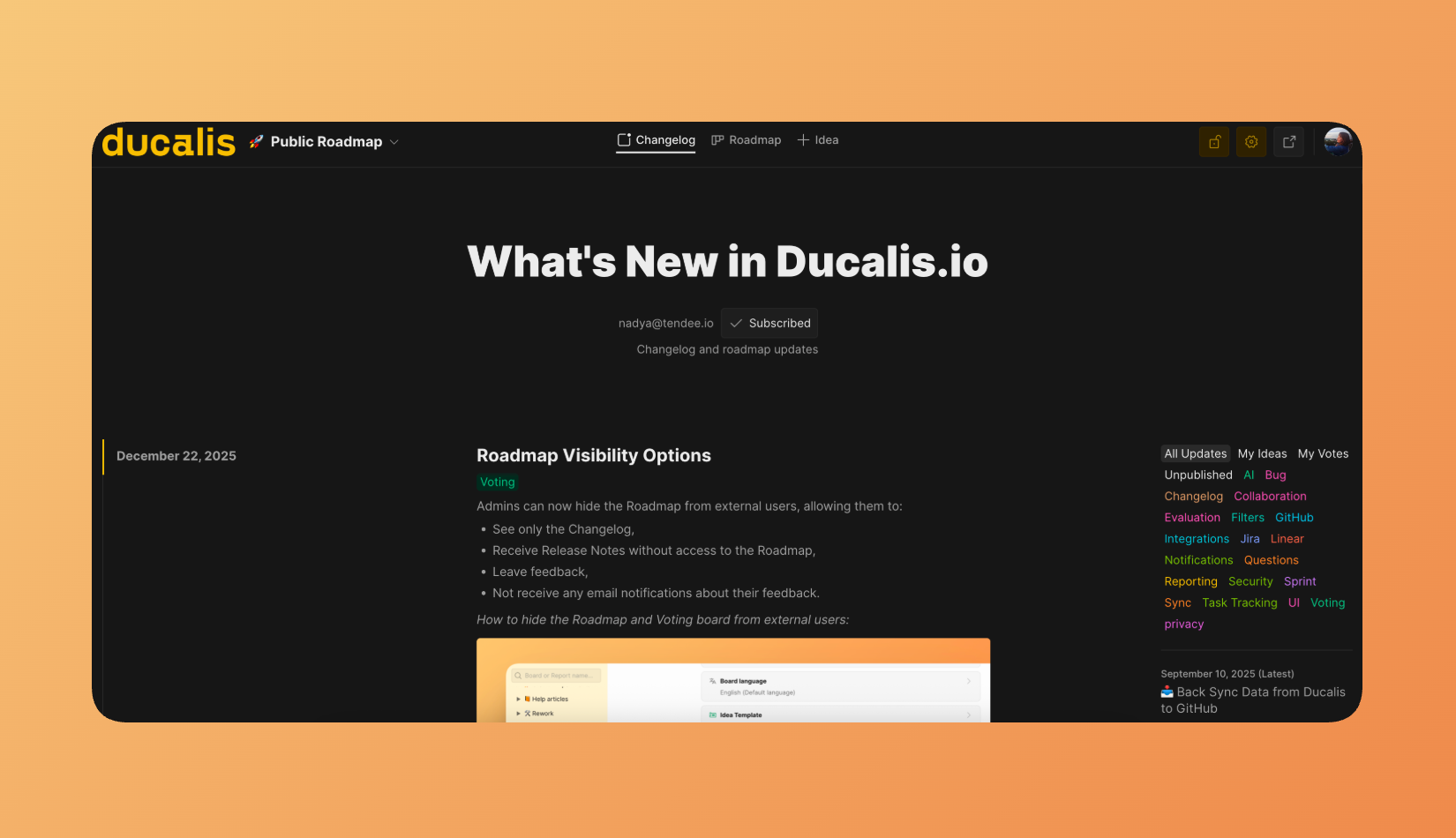
Saiba mais sobre a página Changelog.
Automação de estado
Conecte Ducalis ao seu pipeline de deployment:
| Gatilho | Ação |
|---|---|
| Alteração de estado do task tracker | O estado da Idea atualiza automaticamente |
| CI/CD webhook | Release notes publicam quando o código é implementado em produção |
| Substituição manual | Edite ou atrase qualquer notificação automatizada |
Saiba mais sobre automação de Statuses.
Como a comunicação flui
Como tudo se conecta
Os três módulos formam um ciclo contínuo de feedback:
- Recolher — Os clientes submetem ideias através de Voting Boards ou canais de suporte
- Priorizar — A sua equipa avalia ideias juntamente com planos internos usando critérios partilhados
- Construir — As principais prioridades sincronizam para o seu task tracker e entram em desenvolvimento
- Comunicar — Funcionalidades concluídas desencadeiam notificações para todos os que as pediram
- Repetir — Os clientes veem o seu impacto, construindo confiança e encorajando mais feedback
Resultados do mundo real
As organizações que usam Ducalis reportam melhorias mensuráveis na velocidade de tomada de decisão e entrega de produto.
Caso de estudo de retalho empresarial
Uma grande empresa de retalho com múltiplas equipas de produto implementou Ducalis para substituir a priorização baseada em folhas de cálculo:
| Métrica | Antes | Depois | Melhoria |
|---|---|---|---|
| Tempo de planeamento anual | 18 semanas | 2 semanas | 9x mais rápido |
| Lead time | Baseline | -40% | Redução de 40% |
| Ciclo de entrega | Baseline | -50% | 50% mais rápido |
| Impacto de funcionalidades | Baseline | 5x | 5x mais impactante |
Resultados principais:
- Eliminaram itens de backlog de baixo valor depois da pontuação da equipa revelar que não eram realmente necessários
- Reduziram tempo de reuniões ao substituir discussões síncronas por avaliação assíncrona
- Aumentaram satisfação do cliente ao fechar o ciclo de feedback sobre funcionalidades lançadas
Começar
Obtenha valor de Ducalis em três fases:
Fase 1: Recolher feedback
- Crie um Voting Board para o seu produto
- Incorpore o widget no seu produto, ou partilhe o link do board com clientes
- Conecte os seus canais de suporte (messengers, email)
Aqui está o guia passo a passo sobre recolher feedback.
Fase 2: Priorizar o seu backlog
- Conecte o seu task tracker
- Defina os seus critérios de priorização
- Convide a sua equipa para avaliar os principais itens
Aqui está o guia passo a passo sobre priorização de backlog.
Fase 3: Automatizar comunicação
- Configure regras de automação de estado
- Defina modelos de release notes
- Ative notificações de cliente
Aqui está o guia passo a passo sobre criar Release Notes.