Eisenhower Matrisini Maksimum Potansiyel için Optimize Edin
Eisenhower Matrisi, acil olan ile önemli olan arasında ayrım yaparak görevleri önceliklendirmenize yardımcı olur. İş yükünü yönetmek, stresi azaltmak ve sürekli kriz yönetimi yerine stratejik hedeflere odaklanmak için kullanın.
Bu kılavuz, Eisenhower Matrisini nasıl oluşturacağınızı ve optimize edeceğinizi, yaygın önceliklendirme tuzaklarının üstesinden nasıl geleceğinizi ve çerçeveyi modern takım iş akışlarına nasıl uyarlayacağınızı gösterir.
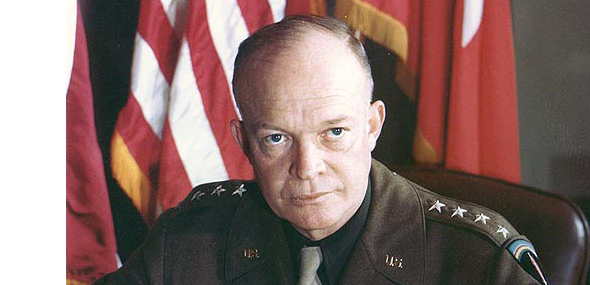
Fotoğraf: US Army Signal Corps/Interim Archives
"Bu hikayeyi, Ordu'da uzun zaman önce duyduğum ifadenin doğruluğunu göstermek için anlatıyorum: Planlar değersizdir, ama planlama her şeydir."
Dwight D. Eisenhower, Ulusal Savunma İcra Yedek Konferansı'ndaki konuşması, 14.11.1957
Eisenhower Matrisinin Tarihi
Dwight D. Eisenhower, Amerika Birleşik Devletleri'nin 34. Başkanı ve II. Dünya Savaşı sırasında 5 yıldızlı generaliydi. Operasyon Torch'u (1942-1943 Kuzey Afrika istilası) ve Batı Cephesi'ndeki 1944-1945 Normandiya istilasını organize etti ve yönetti. Başkan olarak, başarıları arasında 1957 Medeni Haklar Yasası'nı imzalamak, 1956 Federal Yardım Karayolu Yasası'nı başlatmak (eyaletler arası karayolu sistemini yaratan), federal bütçeyi üç kez dengelemek, Kore Savaşı'nı sona erdirmek ve Amerikan prestijini korurken Soğuk Savaş krizlerini sakinleştirmek yer aldı.
Eisenhower, önemli olan ile acil olan arasında ayrım yaparak ezici sorumlulukların üstesinden geldi. Önceliklendirme ilkesi hakkında sorulduğunda şöyle dedi: "Önemli olan nadiren acildir ve acil olan nadiren önemlidir." Bu ilke, Eisenhower Matrisi'nin temelini oluşturdu.
Stephen Covey, Etkili İnsanların 7 Alışkanlığı kitabında Eisenhower'ın çerçevesini popüler hale getirdi ve Eisenhower Matrisini iş dünyasında yaygın olarak kullanılan bir karar verme ve zaman yönetimi aracı haline getirdi.
Eisenhower Matrisi Nedir
Eisenhower Matrisi, görevleri aciliyet ve önem açısından kategorize eden bir önceliklendirme çerçevesidir. İşi dört kadranda bölerek hangi görevleri önceliklendireceğinize, devredeceğinize veya ortadan kaldıracağınıza karar vermenize yardımcı olur.
Eisenhower Matrisi aynı zamanda Acil-Önemli Matrisi, Eisenhower Karar Matrisi veya Eisenhower Kutusu olarak da bilinir.
Eisenhower Matrisi Ne Zaman Kullanılır
Aşağıdakilerden herhangi birini yaşıyorsanız Eisenhower Matrisini kullanın:
- Uzun vadeli hedeflerde ilerleme eksikliği
- Çabaya rağmen işin istenen sonuçları vermemesi
- Zamanın çoğunun gerekli görevler yerine acil durumlarla geçirilmesi
- Görevleri devretmede veya isteklere hayır demede zorluk
- Sürekli erteleme
Eisenhower Matrisini Oluşturun
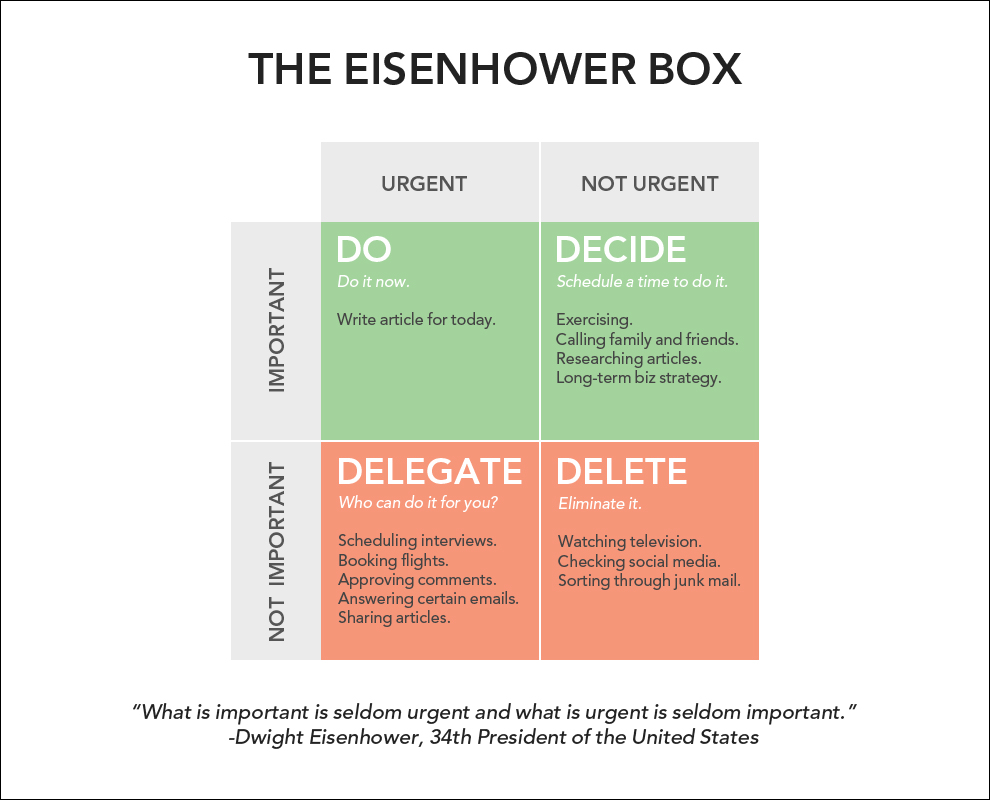
- Dört kadranı olan bir 2×2 ızgara oluşturun.
- X eksenini Acil ve Acil Değil olarak etiketleyin.
- Y eksenini Önemli ve Önemli Değil olarak etiketleyin.
- Görevlerinizi dört kadranda kategorize edin.
- Önemli ve Acil kadranındaki görevleri önce ele alın.
Eisenhower Matrisi şablonu
Önemli ve acil görevler arasındaki fark
Eisenhower'ın önceliklendirme yaklaşımı, acil ve önemli görevler arasındaki ayrıma dayanır. Zamanı etkili bir şekilde yönetmek için hem etkili (doğru şeyleri yapmak) hem de verimli (şeyleri doğru yapmak) olmanız gerekir. Bu, acil görevlere ek olarak önemli görevlere zaman ayırmak anlamına gelir. Bu ayrımı anlamak, sürekli dar son tarihlerden kaynaklanan stresi önler.
Önemli görevler, uzun vadeli misyonunuza, hedeflerinize ve değerlerinize katkıda bulunur. Hemen sonuç üretmeyebilirler, bu da onları gözden kaçırmayı kolaylaştırır. Önemli görevler her zaman acil değildir. Önemli görevlere odaklanmak sizi sakin, mantıklı ve yeni fikirlere açık tutar—yanıt veren bir zihniyette çalışırsınız.
Acil görevler zamana duyarlıdır, acil dikkat gerektirir ve genellikle başka birinin hedefleriyle bağlantılıdır. Onları ele alma zorunluluğu hissedersiniz. Acil görevlere odaklanmak sizi reaktif yapar—savunmacı, baskı altında ve takıntılı.
Önemli görevler, çok uzun süre ertelediğinizde acil hale gelir. Stratejik işin krize dönüşmesini beklemeyin.
İnsanlar tüm acil görevlerin aynı zamanda önemli olduğunu varsayar, ancak bu nadiren doğrudur. Bu yanlış anlama, acil sorunlara ve çözümlere odaklanma eğilimimizden kaynaklanır.
Eisenhower Matrisini Kullanın
Eisenhower Matrisinizi oluşturduktan sonra, tüm görevleri dört öncelik seviyesine kategorize edin:
Kadran 1 (Sol Üst) – Önemli ve Acil görevler: "Yap" kadranı. Bu görevler kritiktir ve mümkün olan en kısa sürede tamamlanmalıdır (genellikle aynı gün).
Kadran 2 (Sağ Üst) – Önemli ama Acil Olmayan görevler: "Karar Ver" kadranı. Bunlar, belirli son tarihleri olmayan temel uzun vadeli hedeflerdir. Bunları mümkün olan en kısa sürede planlayın, "Yap" kadranındaki her şeyi tamamladıktan sonra en önemli olanlarla başlayın.
Kadran 3 (Sol Alt) – Acil ama Önemli Olmayan görevler: "Devret" kadranı. Bu görevleri başkalarına devredin. Bunları yalnızca kadran 1 ve 2'deki görevleri tamamladıktan sonra kendinize atayın.
Kadran 4 (Sağ Alt) – Önemli Değil, Acil Değil görevler: "Sil" kadranı. Bu görevlerden tamamen kaçının. Çoğu gereksizdir ve zaman kaybettirir.
Üretkenlik için görevleri önceliklendirin
Görevlerinizi önceliklendirmek için şu adımları izleyin:
- Zamanınızı matrise göre nasıl harcadığınızı görmek için bir hafta boyunca takip edin. Bir elektronik tablo veya görev yönetimi uygulaması kullanarak zamanınızı 30 dakikalık aralıklarla kaydedin.
- Bir hafta sonra, tamamlanan görevleri hedeflerinize göre uygun kadrana göre sıralayın:
- Bu benim için önemli miydi?
- Bu benim için acil miydi?
- Görevlerin kadranlar arasındaki dağılımını inceleyerek ne yapmanız gerektiğini ve gerekirse matrisinizi nasıl yeniden dengeleyeceğinizi anlayın. İdeal olarak, görevlerin çoğu kadran 2'ye (Önemli ama Acil Değil) düşmelidir.
Kadranları analiz edin
"Yap" kadranı: Buradaki görevler, hemen tamamlanması gereken kritik faaliyetlerdir—ideal olarak aynı gün, en geç ertesi gün. Bunlar krizleri, son tarihleri ve acil sorunları içerir. Gereken çaba nedeniyle en çok zaman ve enerjiyi tüketirler. Zamanınızın çoğunu Kadran 1'de geçirmek strese, tükenmişliğe ve günlerinizin kontrolünüzden çıktığı hissine neden olur. Sürekli yangın söndürme enerji ve coşkuyu tüketir, bu da Kadran 4'ün zihin dağıtıcı aktivitelerine kaçmayı kolaylaştırır.
"Karar Ver" kadranı: Bu önemli ama acil olmayan görevler, hedeflere ulaşma yeteneğiniz üzerinde daha büyük bir etkiye sahiptir. Kadran 2, engeller ve sorunlar yerine fırsatlar ve büyümeye odaklanmanıza olanak tanır. Görevlerin çoğu bu kadranda olduğunda, proaktif olursunuz ve becerilerinizi ve enerjinizi geliştirirken önemli hedeflere katkıda bulunan faaliyetlere öncelik verebilirsiniz. Kadran 2, acil dikkat dağıtıcılardan özgür olduğunuz için "derin çalışma"nın gerçekleştiği yerdir.
"Devret" kadranı: Bu görevler o kadar önemli olmasa da yine de acildir. Takım işbirliği burada çok önemli bir rol oynar. Bu görevleri kendiniz yapabilirsiniz, ancak uygun bir takım üyesine devretmek takım çalışmasını geliştirir ve ilk iki kadrandaki görevler için zaman açar. Devredilen görevleri takip edin böylece daha sonra kontrol edebilirsiniz.
İlerlemeyi takip etmeden devretmek anlamsızdır—kimse sorumlu tutulamaz. Bu kadranda çok fazla zaman geçirmek, daha büyük hedeflere ulaşmadığınız veya günlük işiniz üzerinde kontrolünüz olmadığı hissi verebilir.
"Sil" kadranı: Bu kadran, zaman kaybettiren ve üretkenliği artırmayan kötü alışkanlıkları ortadan kaldırmanızı teşvik eder. Günlük/haftalık rutininizden aktiviteleri keşfedin ve silin. Örnekler arasında açık bir amaç olmadan internette gezinmek veya önemsiz, acil olmayan e-postalara zaman harcamak yer alır.
Matrisinizi yeniden dengeleyin
Görevleri uygun kadranlara organize ettikten sonra zamanınızın nerede harcandığını inceleyin ve analiz edin:
Zamanın çoğu Kadran 1'de geçiyorsa: Sorunları öngörmek, tespit etmek ve önlemek için planlama ve hazırlığa odaklanın.
Çözüm: Mevcut hedefler ve son tarihlere göre haftalık/aylık bir program oluşturun. Haftalık inceleme ve yansıtma yapın. Stratejinizin ne kadar iyi performans gösterdiğini değerlendirin ve bir sonraki hafta için ayarlama yapın. Kadran 1 görevlerinin çoğu dış kaynaklardan geliyorsa, planlamayı nasıl iyileştireceğinizi ve onları daha iyi nasıl tahmin edeceğinizi düşünün. Daha proaktif bir yaklaşım oluşturmak için bir müşteri veya meslektaşla işbirliği yapmanız veya aşırı yükleyici bir programı yeniden dengelemek için yöneticinizle konuşmanız gerekebilir.
Zamanın çoğu Kadran 2'de geçiyorsa: Bu ideal durumdur.
Çözüm: Fırsatlardan yararlanmak ve büyümeyi maksimize etmek için görevleri ve aktiviteleri dağıtın ve planlayın. Görevin her adımı için uygun bir son tarih belirleyin.
Zamanın çoğu Kadran 3'te geçiyorsa: Burada geçirilen zamanı en aza indirmek için bu görevleri mümkünse ortadan kaldırın veya devredin.
Çözüm: Bu görevleri sınırlamak için ayrıntılı eylemler planlayın ve yazın. Şunları deneyin:
- Görevleri devredin
- Görevlere hayır deyin
- Zamanınızı nasıl geçirdiğinizi yöneticinizle görüşün
Yöneticiyseniz, takımınıza iş devredeceğinizi bildirin böylece ikiniz de öncelikleri yeniden düzenleyebilirsiniz.
Zamanın çoğu Kadran 4'te geçiyorsa: Muhtemelen kendini tatmin olmamış hissediyorsunuz, bir sorundan kaçınıyorsunuz veya streslisiniz.
Çözüm: Zamanınızı takip edin, en çok zaman kaybettiren şeyleri keşfedin ve analiz edin ve onlardan kaçınmak veya sınırlamak için bir strateji geliştirin. Ertelemeyi aşmak için bir strateji hazırlayın. Ara sıra rahatlamanın sorun olmadığını unutmayın, ancak bu kadrandaki aktiviteler aşırı yapıldığında azalan getiri sunar. Kendinize sorun:
- Neyi başarmaya çalışıyorum?
- Yaptığım şey hedefe ulaşmama yardımcı oluyor mu?
Eisenhower Matrisini Kullanmak İçin İpuçları
- Dikkat dağıtıcıları ortadan kaldırın ve kendi önceliklerinizi belirleyin.
- Sabah planlayın, ardından en yüksek performans saatlerinde görevlere odaklanın.
- Devredilen görevlerdeki ilerlemeyi takip etmek için zaman ve görev yönetimi araçlarını kullanın.
- Çalışma saatlerinde web gezinme ve sosyal medya gibi sağlıksız alışkanlıkları engelleme yazılımı kullanarak kırın.
- Kendinize sorun: Başlamak için en önemli şey nedir? "Yap" ve "Karar Ver" kadranlarındaki görevler için Mark Twain'in "Önce Kurbağayı Ye" konseptini uygulayın—önce en zor görevi yapın. Bu size günün geri kalanı için momentum ve enerji verir.
- Ertelemeden ve aşırı yönetimden kaçının.
- Her kadranı en fazla 8 görevle doldurun. Daha fazla eklemeden önce en kritik olanı tamamlayın. Amaç görevleri toplamak değil tamamlamaktır.
- Yapılacaklar listesi oluşturun. Bu sizi sürekli ezberlemeden kurtarır ve önceliklendirdiğiniz şeylerden sorumlu olmanıza yardımcı olur.
Eisenhower Matrisinin Varyasyonları
Zamanla, Eisenhower Matrisinin farklı versiyonları X ve Y eksenindeki kriterleri değiştirerek farklı ihtiyaçları yansıtacak şekilde gelişti:
- Etki - Efor
- Değer - Fizibilite
- PICK Çizelgesi: Kolay/Zor - Düşük Getiri/Yüksek Getiri
- Risk - Getiri
- İş Değeri, Efor, Risk
- Stratejik öncelik - Aciliyet
- Müşteri etkisi - Beklenen/Beklenmeyen
- Karmaşıklık - Yenilik
- Değer/Etki - Başarı olasılığı/İhtimal
- Pazar yeniliği - Ürün yeniliği
Önceliklendirme Matrislerinin Sorunları
Çoğu önceliklendirme çerçevesi, fırsatları/özellikleri belirli metriklere göre kategorize eder, ardından oluşturulan listeye veya matrise göre önceliklendirir. Bu iki ana sorun yaratır:
Önceliklendirme sonuçları keyfidir: Birçok faktör bir karar verildikten sonra bilinene kadar bilinmez. Küçük kararlar, büyük kararlardan daha düşük potansiyel faydaya sahiptir, ancak büyük kararlar aynı zamanda büyük potansiyel dezavantaj taşır. Çoğu fikir başarısız olduğundan, güven seviyeleri düşüktür. Araştırma ve prototipleme güveni artırabilir, ancak çok sayıda fikir bunu her biri için yapmayı imkansız kılar. Son derece öngörülemez bir ortamda çalışmanız ve önceliklendirme yapmanız gerekir.
Bazı çerçeveler bunu güveni bir bileşen olarak dahil ederek çözmeye çalışır, ancak belirsizliği ölçmek zor kalır. Çerçeveler, yüksek değer düşük efor öğelerini ve düşük değer yüksek efor öğelerini tespit etmeyi kolaylaştırır—bunlar bir çerçeve olmadan bile tanımak için basittir. Kafa karışıklığı ortada ortaya çıkar; burada birkaç varsayımı değiştirmek fikirlerin sırasını ve dolayısıyla önceliği etkileyebilir.
Önceliklendirme çerçeveleri yanlış sorunu ele alır: Önceliklendirmenin ana zorluğu hayır demektir. Önceliklendirmek zor değildir çünkü en umut verici fikirleri belirlemek zor değildir, ancak daha az umut verici—ancak yine de iyi—fikirlere hayır demek zordur.
Büyük hırslar, aşırı güven ve paydaşlara en sevdikleri fikirlerin işe yaramayacağını söylemek istememek, takımların çok fazla proje üstlenmesine neden olur. Bu, birçok şeyin yetersiz ele alınmasına, sorunları araştırmaya ve anlamaya yeterli zaman harcanmamasına ve kısayollarla acele çözümler sunulmasına neden olur. Bu yaklaşım, iyi bir ürün sunma olasılığı çok daha düşüktür.
Öncelikli fikirleri uygun özen ve uzmanlıkla uygulamak için yeterli zamana sahip olsalar bile, takımlar genellikle beklenen iş değerinin teslim edilmesini sağlamak için gereken revizyonlar için yeterli zaman ayırmamıştır.
Önceliklendirme matrislerini optimize edin
Önceliklendirme matrislerinin sorunlarını ve dezavantajlarını iki şekilde ele alın:
İyi hizalanmış, tutarlı bir takım oluşturun: Bu, teorik çerçevelere dayalı herhangi bir önceliklendirmeden çok daha değerlidir. Tüm girdileri toplamak ve ardından fonksiyonlar arası, güçlendirilmiş bir takım olarak en önemli öncelikler hakkında diyalog kurmak, önceliklendirmeye çok daha üstün bir yaklaşımdır. Tüm takım fikre ve plana inanıyorsa—paylaşılan bir takım kararı—başarılı olma olasılığınız daha yüksektir. Herkes elinden gelenin en iyisini yapacaktır çünkü sürecin bir parçası olduklarını ve görüşlerinin duyulduğunu ve dikkate alındığını hissederler. İnsanlar projenin başarılı olmasını ister, bu yüzden iyileştirme için en iyi fikirlerini sunar ve yüksek kaliteli çözümler için beyin fırtınası yaparlar.
Güçlü liderlik: Liderler, takımların kendi öncelik kararlarını vermelerine izin verirken onlar için açık, iyi tanımlanmış hedefler oluşturmalıdır. Takımları daha az fikre odaklanmaya teşvik edin. Yalnızca bu şekilde takım, kullanıcılara ve işletmelere gerçekten değer katan yenilikler yaratacaktır.
Eisenhower Matrisini Ducalis ile Optimize Edin
Ducalis, Eisenhower Matrisini kuruluşunuza göre uyarlamanıza ve geleneksel dezavantajların üstesinden gelmek için optimize etmenize olanak tanır. Aşağıdakileri göz önünde bulundurun:
- Hedefleriniz ve mevcut kaynaklarınız
- Takım hizalanması
- Yönetim yığınınızla senkronizasyon
- Dinamik yaklaşım ve farklı görevlere uyarlanabilirlik
Hedefleriniz ve kaynaklarınız etrafında oluşturun
Önceliklendirme çerçevenizden en iyi şekilde yararlanmak için şunları yapması gerekir:
- Takımınızın hedeflerini ve mevcut kaynakları dikkate alın
- Takımınızın hedefleri ve performansıyla ilgili özelleştirilmiş kriterler kullanın
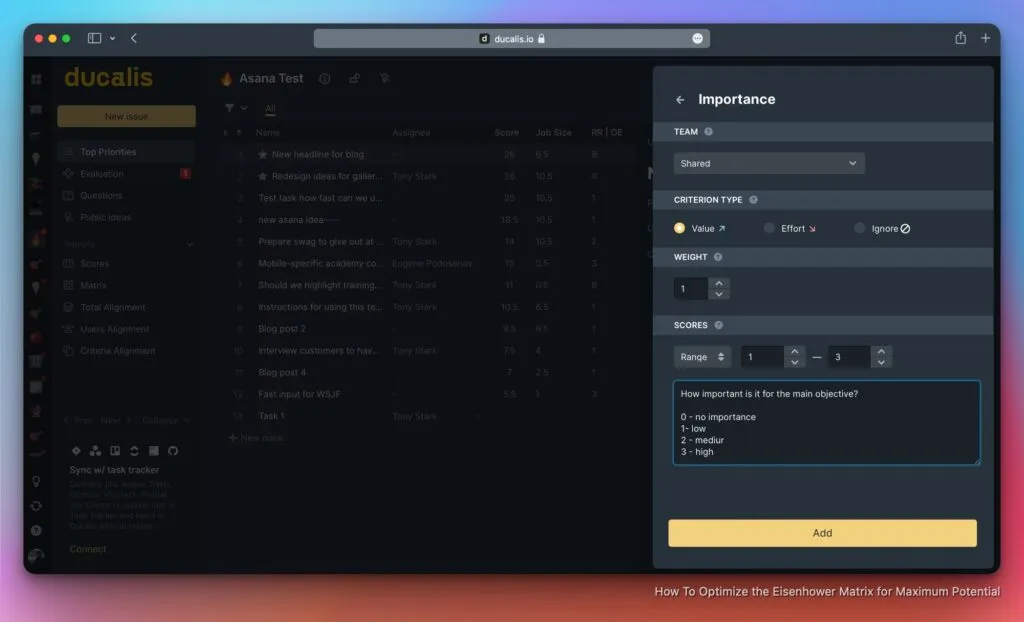
Ducalis her ikisini de yapmanızı sağlar. İki ana özelleştirilebilir kriter türü vardır:
Değer odaklı kriterler: Takımınızın hedeflerine ve amaçlarına odaklanır. Bunlar Aktivasyon, Elde Tutma, Virallik, Hız, Satış, Erişim vb. içerir.
Efor odaklı kriterler: Takımınızın mevcut kaynaklarına odaklanır. Bunlar Geliştirme zamanı, UX zamanı vb. içerir.
Eisenhower Matrisinin bu optimizasyonu, doğruluğunu, verimliliğini ve güvenilirliğini artırır.
Takımınızı güçlendirin
Takımınızın etkili bir şekilde çalışması için, genel süreci olumsuz etkileyebilecek yargıdaki önyargıyı en aza indirin. Önemli bir örnek HiPPO etkisidir (En Yüksek Ücretli Kişinin Görüşü), kararlar en yüksek ücretli bireyin yargısına ertelendiğinde, çünkü insanlar odadaki en kıdemli kişiyi memnun etmek için bir konunun içeriğini göz ardı ederler.
Takım hizalanmasını kullanarak bu sorunu ortadan kaldırın. Takımınız hizalandığında, farklı rollerden ve departmanlardan çalışanların takım hedeflerine ve amaçlarına ulaşmak için iletişim kurduğu ve işbirliği yaptığı karşılıklı anlayış vardır. Bu birçok fayda sağlar:
- Geliştirilmiş şeffaflık ve hesap verebilirlik
- Geliştirilmiş fikir üretimi ve işleme
- Sonuçlar için paylaşılan hesap verebilirlik
- Azaltılmış fazlalık ve geliştirilmiş bilgi alışverişi
- Çalışanlar arasında artan güven seviyesi ve işbirliği
Ducalis, takım hizalanması elde etmek için beş araç sağlar:
Hedeflerinize dayalı özelleştirilebilir önceliklendirme kriterleri: Gereksinimlerine göre her takım için benzersiz bir matris oluşturun.
Değerlendirme sürecinde işbirliği: Tüm takım değerlendirmeye katılır. Bu güçlendiricidir çünkü herkesi dahil eder, fikir alışverişini teşvik eder ve herkesin sesinin duyulmasını ve dikkate alınmasını sağlar. Başkalarının nasıl oy verdiğini ve çeşitli konular hakkında ne düşündüklerini gördükten sonra, insanlar neyin önemli olduğunu ve neden olduğunu anlarlar. Daha sonra ne yapılması gerektiğine dair net bir resme sahip olurlar.
Takım hizalanma ızgarası aracılığıyla farklılıkların analizi: Takım hizalanma ızgarası, takımınızın tam olarak nerede anlaşmazlığa düştüğünü gösterir. Sorun yaratan alanlara odaklanabilmeniz için puanlardaki farklılıkları görüntüler. Bireylerin aynı kriterleri nasıl önceliklendirdiğine göre takımınızın farklı görevlerde ne kadar hizalandığını görebilirsiniz.
Sorular bölümü: Bir durum hakkında belirsiz bir şey varsa, soru sorun. Her görevin Ducalis içinde takım arkadaşlarınızdan sorular sorabileceğiniz ve alabileceğiniz kendi alanı vardır. Takımınızda tartışılan tüm soruları da görebilirsiniz.
Öncelikleri güncel tutmak için puan sona erme süresi: Bu işlev, konuların önemini dinamik olarak değerlendirmeye yardımcı olur. Projeyi sprint'lere ve döngülere bölebilir, ardından değişen dış koşullar ışığında görevlerin önemini gözden geçirebilirsiniz. Bu, takımınızı meşgul tutar ve yeni konseptler için beyin fırtınası yapmalarını sağlar.
Takımınızı hizaladığınızda, hedefleriniz ve kaynaklarınız arasındaki dengeyi optimize edersiniz.
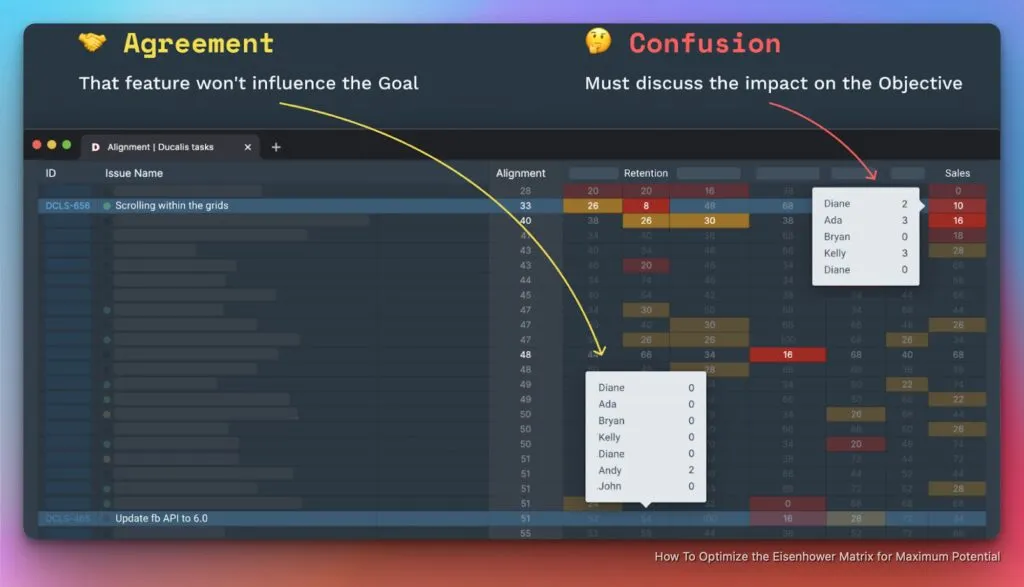
Takım hizalanma ızgarası, takımınız arasındaki anlaşmazlık alanlarını gösterir
Yönetim yığınınızı güçlendirin
Dwight D. Eisenhower ve Stephen Covey Eisenhower Matrisini ilk oluşturduğunda, onu çizdiler ve görevleri manuel olarak doldurdular. O zamandan beri işler değişti. Bugün, çoğu takım Jira, Asana, Trello ve ClickUp gibi görev izleyiciler kullanıyor. Eisenhower Matrisini manuel olarak oluşturmak ve görevleri görev izleyicilerden ona kopyalamak, başka yerlerde daha iyi kullanılabilecek zamanı harcar.
Ducalis bu sorunu çözer. Tüm görevler mevcut iş listeleriyle senkronize edilir ve matrisin kadranları içinde otomatik olarak dağıtılır. Ducalis, önceliklendirme gücünü favori görev izleyicinizle birleştirerek size tek bir yerde araç değiştirmeye gerek kalmadan mümkün olan en iyi sonuçları verir. Ducalis, Asana, ClickUp, Jira, Pivotal, Google Sheets, Trello, Yandex Tracker ve YouTrack ile senkronizasyon sunar.
Değişen önceliklere uyum sağlayın
İşin gerçeği, sürekli değişen ve gelişen olmasıdır, bu da tüm kriterleri aynı anda etkileyen en üretken görevleri bulmayı zorlaştırır.
Ducalis, aktivasyonu iyileştirmek için hızlı kazanımları nasıl bulacağınız ve bir UX uzmanının ilgili kriterleri ayarlayarak ne üzerinde çalışması gerektiği gibi sorulara cevap bulmanıza yardımcı olur. Ducalis, dinamik iş ortamına uyum sağlamak için kullandığınız kriterleri istediğiniz zaman güncellemenize olanak tanır. Bu size gerçek zamanlı hedeflere odaklanma ve iş listesi gürültüsünü azaltma fırsatı verir.
Ducalis ile Eisenhower Matrisini kullanın
- Favori görev izleyicinizi Ducalis ile senkronize edin veya görevleri CSV sayfası aracılığıyla manuel olarak ekleyin.
- Ducalis için kaydolduktan sonra, kriterlerinizi tanımlayıp özelleştirerek ve ardından onlara ağırlıklar atayarak şablonunuzu kişiselleştirin.
- Görevleri kendiniz veya takımınızla değerlendirin.
- Önceliklendirme için temel olarak mevcut hedeflerinize göre ilgili kriterleri seçin.
- Görevler, aldıkları puanlara göre matrise yerleştirilecektir.
Matrisi mevcut ihtiyaçlarınıza göre ayarlamak için kriterleri etkinleştirin ve devre dışı bırakın
Başlayın
Ducalis, takımınızı en önemli öncelikler etrafında hizalı tutan bir görev önceliklendirme aracıdır. Her takım üyesinin görüşünün duyulmasını ve değer verilmesini sağlar. Kararlar işbirliği içinde verilir, böylece her takım üyesi güçlendirilmiş hisseder. Takım hizalanması tek seferlik bir aktivite değildir—doğru ve tekrar tekrar yapıldığında, takım moralini ve paylaşılan anlayışı artırır ve uzun vadede çalışan devir oranını azaltır. Ducalis ücretsiz deneyin ve önceliklendirme ve takım hizalanma çabalarınızı geliştirmek için takım üyelerini davet edin.