Görevleri hızlı önceliklendirin
Ekipler binlerce ürün fikri ve müşteri özellik talebi biriktiriyor. Nereye odaklanılacağına karar vermek asıl zorluk. Bu kılavuz, kanıtlanmış deneyime dayalı hızlı ve yapılandırılmış bir önceliklendirme süreci nasıl oluşturulacağını gösteriyor.
Toplantılar ve çerçeveler tek başına neden işe yaramaz
Tüm görevleri çevrimiçi senkronizasyon toplantılarında tartışmak verimsiz olduğunu kanıtladı. 100 konuyu gözden geçirmek saatler alıyor ve ekipler ilk saatten sonra odağı kaybediyor. Planlanan konuların yalnızca %20'si gözden geçiriliyor. İletişim en büyük darboğaz haline geliyor.
"İletişim en büyük zorluktur. Her ekibin ve kişinin neye öncelik verdiğini ve nasıl çalışmayı tercih ettiğini bilmek zordur." Hiten Shah

Önceliklendirme çerçeveleri değerlendirmeyi yapılandırmaya yardımcı olur. Ekip üyeleri kriterlere göre asenkron olarak puan verirler. Google Sheets ile başlamak yalnızca yüksek puan alan görevleri tartışmayı mümkün kıldı.
RICE, REAN ve KANO gibi çerçeveler önceliklendirmeyi kolaylaştırır ancak her şeyi çözmez. Tam konu bağlamı sağlamak ve görüşleri verimli şekilde toplamak için yine de süreçlere ihtiyacınız vardır.

Çerçeveler ilk adımdır. Bunları işe yaratmak için iyi oluşturulmuş bir sürece ihtiyacınız var.
Hızlı görev önceliklendirmesi için 5 adım
Bu kılavuz, öğrenilen dersleri adım adım bir sürece damıtıyor. Bu önceliklendirme yaklaşımını yaklaşık bir haftada oluşturabilirsiniz.
Adım 1: Düzgün görev açıklamaları yazın
Bir görevi anlamak net bir açıklama gerektirir. Problem bildirimi kılavuzunu takip edin:
Net ve kısa Ekipteki herkes bağlam olmadan problemi anlamalıdır. Doğru olun ancak özlü olun—uzun açıklamalara zaman harcamayın.
Spesifik ve desteklenmiş Ekran görüntüleri, dokümanlar, bağlantılar veya destekleyici materyaller ekleyin. İnsanları tahmin etmeye veya veri aramaya zorlamayın.
Okunabilir Paragraflar, madde işaretleri, numaralı listeler ve yazı tipi stilleri kullanın. Okunabilirliği artırmak için temel detayları vurgulayın.
Makul Ara kontrol noktaları için büyük görevleri alt görevlere bölün. Her şeyi tek bir göreve sığdırmayın.
Problem bildirimi şablonu
Problem
Problemi yeterli detayla açıklayın. Ne kadar iyi açıklarsanız, ekip arkadaşlarının alternatif çözümler önermesi o kadar olasıdır.
Sonuç
İstenen çıktıyı ve beklenen sonuçları açıklayın.
Çözüm veya yorumlar (isteğe bağlı)
Problemi çözmeye ilişkin fikirlerinizi veya müşterilerden veya ekip arkadaşlarından gelen ilgili yorumları ekleyin.
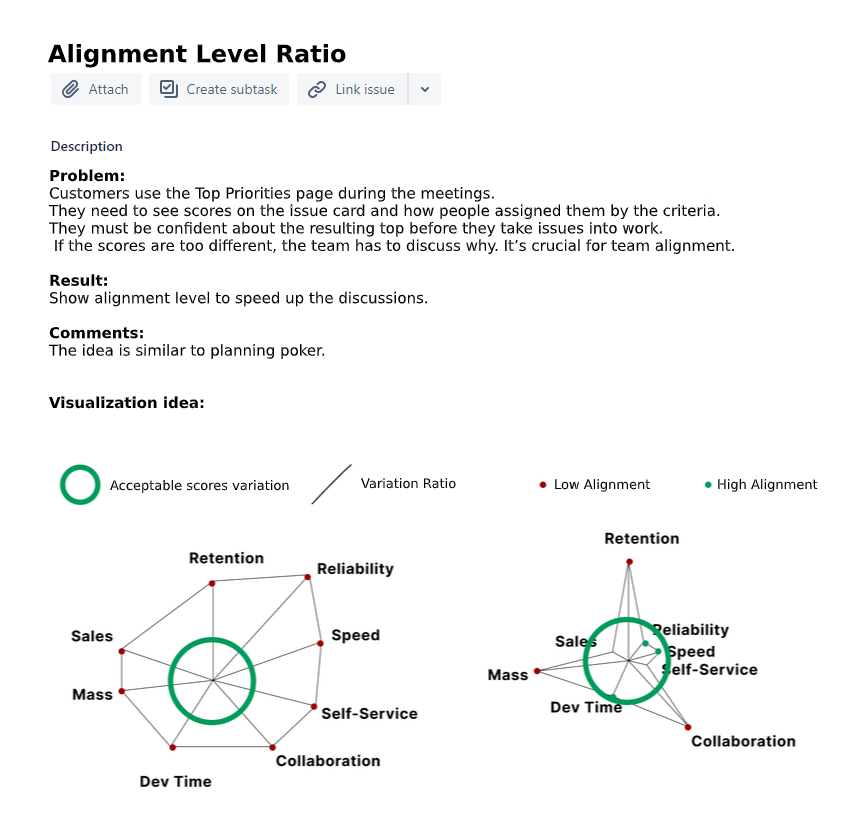
Net olarak belirtilmiş bir konu örneği.
Adım 2: Net değerlendirme kriterleri tanımlayın
Bir önceliklendirme çerçevesi kullanabilirsiniz, ancak tek bir çerçeve tüm ekipler için işe yaramaz. Birkaç çerçeveden kriterleri birleştirin ve bunları ekibiniz ve ürününüz için özelleştirin.
Örnek kombinasyon:
North Star Metriği + RICE + AARRR + İş Sorun Noktası
- Satışlar — Gelir gelirini etkiler (AARRR'den Edinme)
- Aktivasyon — Kullanıcıların ürünün nasıl çalıştığını anlamasına yardımcı olur (AARRR'den Aktivasyon)
- Elde Tutma — Ürünü tekrar kullanma motivasyonunu artırır (AARRR'den Elde Tutma)
- Hizmet — Müşteri destek süresini kalite kaybı olmadan azaltır (İş Sorun Noktası)
- FB Reklamları — Ürün aracılığıyla başlatılan Facebook Reklamlarını artırır (Ürün North Star Metriği)
- Zaman — Gereken geliştirme süresi (RICE'dan Efor)
- Kitle — Etkilenen müşteri sayısı (RICE'dan Erişim)
Her kriteri 0'dan 3'e kadar bir ölçekte değerlendirin. Bazı ekipler Fibonacci Dizisini kullanır, ancak basit bir ölçek karmaşıklık eklemeden iyi çalışır.
Adım 3: Önceliklendirme araçlarını seçin
Araçlar üç temel fayda sağlar:
Hızlı Araçlarda veya elektronik tablolarda asenkron değerlendirme, her şeyi aramalarla tartışmaktan daha hızlıdır.
Esnek Tüm kriterler eşit değere sahip değildir. Geliştirme Zamanının olumsuz etkisi vardır, Elde Tutma ise Satışlardan daha önemli olabilir. Araçlar kriter ağırlıklarını hızlı şekilde ayarlamanızı sağlar.
Otomatik Zaman temel bir kaynaktır. Önceliklendirmeye zaman harcayın, ancak görevleri uygulamaktan çok daha az. Araçlar süreci otomatikleştirir ve gerçek iş için zaman kazandırır.
Önceliklendirme nasıl otomatikleştirilir
Elektronik tablolar
Google Sheets, Notion, AirFocus ve Coda, hesaplama formülleri ayarlayabildiğinizde iyi çalışır.
Google Sheets ile başlamak, konuları Jira'dan yüklemeyi ve orada değerlendirmeyi gerektiriyordu. Önceliklendirme başlangıçta hızlandı ancak birkaç hafta sonra çalışmayı durdurdu. Formüller bozuldu, elektronik tablolar dondu ve görevler kayboldu veya çoğaltıldı. Ekip, konuları Jira'da okumak için düzinelerce sekme açmak zorunda kaldı ve sık sık değerlendirmeyi unuttu.
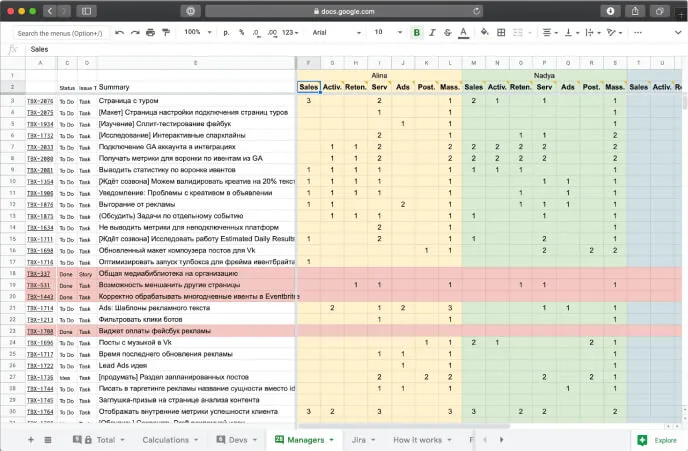
Elektronik tablolar çalışır ancak bir yönetici gerektirir. Bunları düzeltmek için ayda yaklaşık 15 saat harcamayı bekleyin.
Özel araçlar
Önceliklendirme araçları başka bir yaklaşım sunar. Google Sheets deneyiminden sonra Ducalis gibi araçlar ortaya çıktı. Arayüz elektronik tablolara benziyor ancak tam konu bağlamı içeriyor ve daha hızlı çalışıyor.
Ducalis, puanları kaybetmeden veya hesaplama formüllerini bozmadan kriterleri ayarlamanıza olanak tanır. Ayrıca ekip hizalanmasını göstermek için puan anlaşmazlıklarını vurgular.
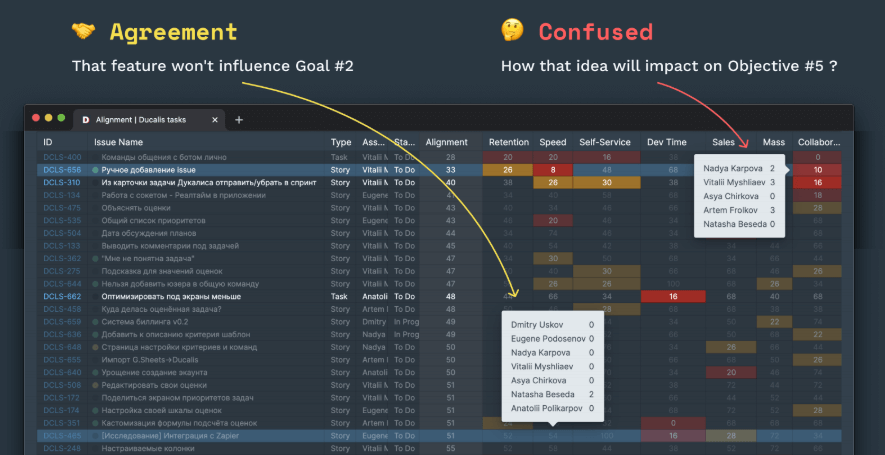
Adım 4: Çeşitli görüşler toplayın
Farklı ekipler görevleri birlikte değerlendirebilir: ürün yöneticileri, geliştiriciler, tasarımcılar ve satış yöneticileri. Her birinin benzersiz bağlamı ve uzmanlığı vardır. Bu, değerlendirmeyi daha az öznel ve daha profesyonel hale getirir.
Satış yöneticileri satışlar üzerindeki etkiyi anlar, geliştiriciler geliştirme karmaşıklığını bilir ve pazarlamacılar promosyon faydasını görür.
Kriterleri farklı ekipler arasında bölün. Ortak değerlendirme ekipleri senkronize eder, onları hedefler etrafında hizalar ve her konunun kuşbakışı görünümünü sağlar.

Adım 5: Önceliklendirmeyi haftalık alışkanlık haline getirin
Önceliklendirme düzenli olmalıdır. Her hafta veya her gün yeni görevler ve fikirler ortaya çıkar. Bazıları zaten planlanmış işten iş hedefleriyle daha alakalı olabilir. Önceliklerin hizalı kalmasını sağlamak için konuları tutarlı şekilde yeniden değerlendirin.
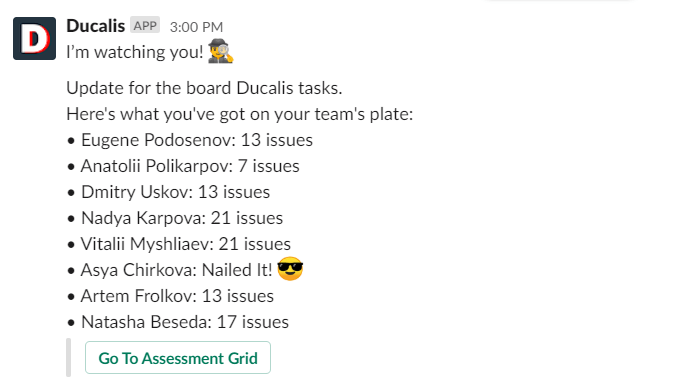
Cuma değerlendirme günüdür—ekip asenkron olarak iş listesini düzenler ve gelecek sprint'i planlar. Slack'te haftalık hatırlatıcılar alışkanlığı sürdürmeye yardımcı olur.
Özet
Ne kadar önemli olduğunu bilse bile kimse görevleri değerlendirmek ve tartışmak için saatler harcamak istemez. Önceliklendirme hızlı, sorunsuz ve yapılandırılmış olmalıdır. Yukarıdaki adımlar bunu başarmanıza yardımcı olur. Uzun aramalardan otomatik bir sürece geçiş, önceliklendirmede yaklaşık 20 dakikaya ve her hafta tartışmalarda ekip zamanının %0,5'ine indirildi.
Bu kılavuzu uygulayın ve ekibinize gerçek iş için yüzlerce saat kazandırın.