Görev önceliklendirme matrisi: Nasıl kullanılır
Önceliklendirme matrisleri, görevleri aciliyet, etki ve efor gibi kriterlere göre değerlendirmenize yardımcı olarak ekibinizin yüksek değerli işlere odaklanmasını sağlar.
Bir proje yöneticisi önceliklendirme kaosunu nasıl çözdü
John ile tanışın—özellik talepleri, ürün iyileştirmeleri ve müşteri talepleriyle boğuşan bir proje yöneticisi. Geleneksel görev yöneticileri, görevleri takip etmesine yardımcı oluyor ancak kritik soruyu cevaplamıyor: Önce ne yapmalıyım?

John yaygın sorunlarla karşı karşıya:
- Çok fazla acil ve önemli görev
- Önceliklendirme için net kriterlerin olmaması
- Hangi görevlere odaklanacağını sınırlayan bütçe kısıtlamaları
- Ekip üyelerinin iş değeri yerine ilgiye göre görev seçmesi
Deneyimli proje yöneticileri Eisenhower yaklaşımını önerir: önce acil ve önemli görevlere odaklanın. Peki her şey acil ve önemli hissettiriyorsa ne yapmalı?
Net olmayan önceliklerin gizli maliyeti
Net önceliklendirme kriterleri olmadan ekipler kişisel tercihlere göre hareket eder. En değerli olanlar yerine en heyecan verici veya anlaşılır görevleri seçerler.

Bu çeşitli sorunlar yaratır:
- İş hedefleri ekip ilgilerinin gerisinde kalır
- Geliştiriciler kullanıcı ihtiyaçları yerine beceri geliştirmeye odaklanır
- Müşteri ihtiyaçları ihmal edilir
- Değerli projeler gecikir
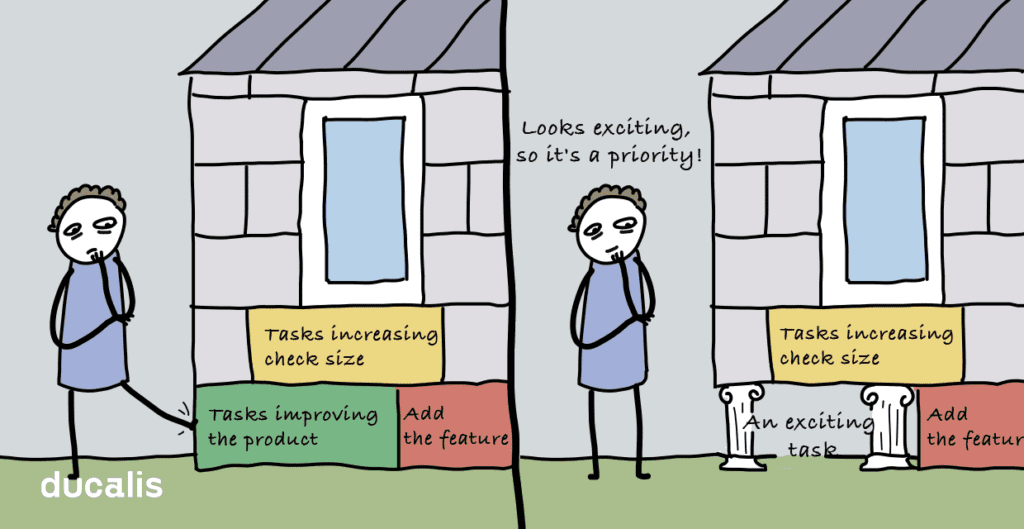
Sonuç mu? Ekip üyeleri deneyim kazanır, portföylerine projeler ekler ve ayrılır—iş zarar görürken.
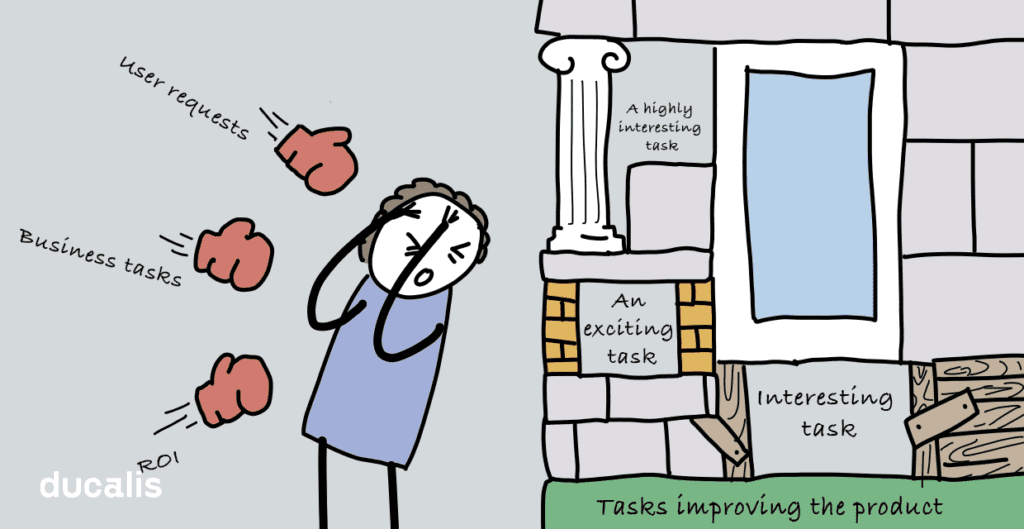
Çözüm: Görevleri nesnel olarak değerlendirmek için önceliklendirme matrisleri kullanın. Popüler çerçeveler arasında Eisenhower, AARRR, RICE ve WSJF bulunur. Tümü aynı prensibi paylaşır: her görevi birden fazla kritere göre değerlendirin.
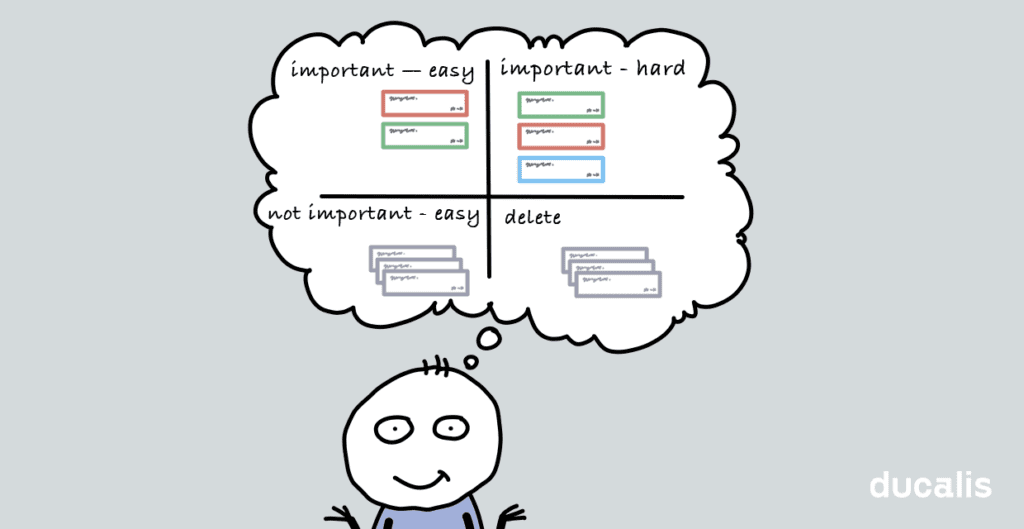
Önceliklendirme matrisleri nasıl çalışır
Eisenhower matrisi en popüler önceliklendirme aracıdır. Görevleri iki eksende değerlendirir: aciliyet ve önem.
Geleneksel yaklaşım: Her kritere ikili değerler (evet/hayır, 1/0) atayın. Ancak tüm önemli görevler eşit derecede önemli değildir.
Daha iyi yaklaşım: Nüansı yakalamak için derecelendirme ölçekleri (5 puanlık veya 10 puanlık) kullanın:
- Kullanıcı kimlik doğrulaması eklemek: önem için 5
- Safari menü görüntüleme hatasını düzeltmek: önem için 3
Daha da iyi: Birden fazla uzmandan girdi toplayın. Farklı ekip üyelerinin farklı bakış açıları vardır:
- Topluluk yöneticileri Safari hatasına öncelik verir (şikayetleri duyarlar)
- Geliştiriciler daha düşük puan verebilir
- Pazarlama uzmanları edinme özelliklerine odaklanır
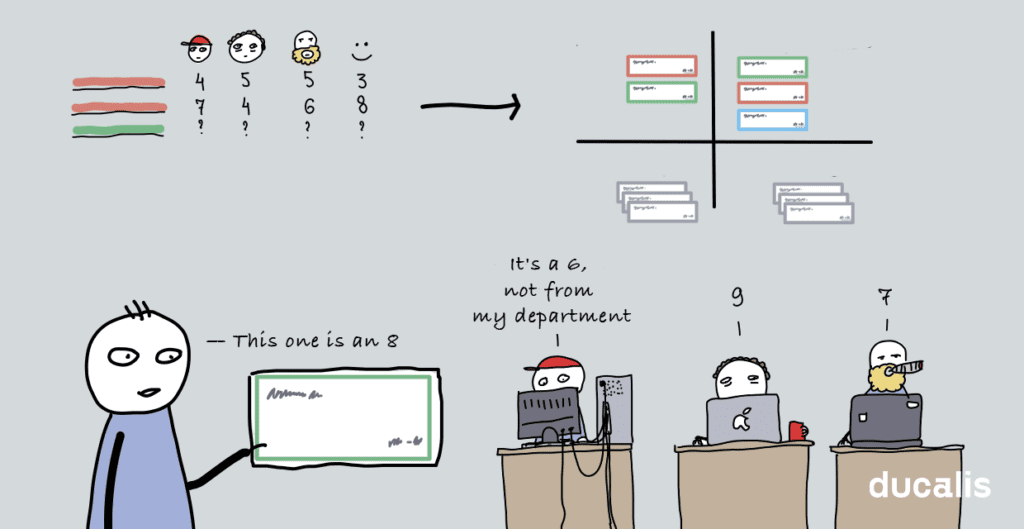
Girdi ne kadar çeşitli olursa öncelikleriniz o kadar nesnel olur.
Gelişmiş önceliklendirme teknikleri
Nesnel önceliklendirmeyi anlayan proje yöneticileri genellikle ekip üyelerinin paylaşılan hücrelerde görevleri derecelendirdiği Google Sheets şablonları kullanır.
Gelişmiş özellikler:
- Ağırlıklı değerlendirmeler (deneyimli profesyonellerin puanları 1,2 ile çarpılır)
- Görevleri otomatik olarak içe aktarmak için JIRA senkronizasyonu
- Öncelik puanlarını hesaplamak için özel formüller
Bunu "[çerçeve adı] + template + excel" aramalarıyla kendiniz oluşturabilir veya Ducalis gibi özel araçlar kullanabilirsiniz.
Ducalis ne yapar
Ducalis, JIRA, Trello, Asana ve Google Sheets'ten görevleri içe aktarır ve ardından bunları gerçek zamanlı olarak senkronize eder.
Temel özellikler:
- Birden fazla önceliklendirme çerçevesi (Eisenhower, RICE, WSJF, özel)
- Görev öncelikleri üzerinde ekip oylaması
- Puanlar önemli ölçüde farklılaştığında bildirimler
- Özel değerlendirme kriterleri ve çarpanlar
- Belirli görev alt kümelerini görüntülemek için filtreler
Örnek: Bir geliştirici Safari menü hatasına düşük öncelik verirken, topluluk yöneticisi (sık şikayetler alan) yüksek puan verir. Ducalis bu tutarsızlığı vurgular böylece John araştırabilir.
Düşük asılan meyve stratejisi uygulamak için en az efor ve en yüksek etkiye sahip görevleri filtreleyin—işte bir sonraki sprint'iniz.
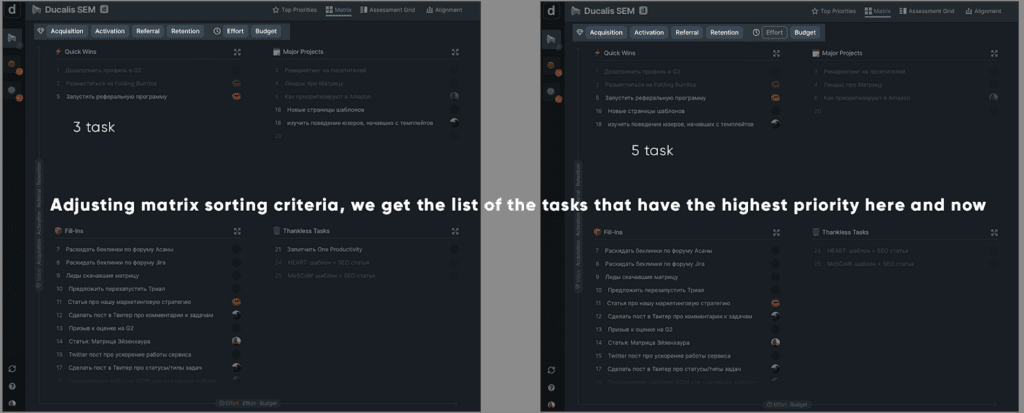
Öncelik matrisi nedir
Öncelik matrisi, öncelikleri görsel olarak dört (veya daha fazla) çeyreğe ayıran bir yönetim aracıdır.
Matrisleri kişisel zaman yönetimi veya karmaşık iş projeleri için kullanabilirsiniz. Çoğu, kişisel görevler için oluşturulmuş Eisenhower matrisinden türetilmiştir.
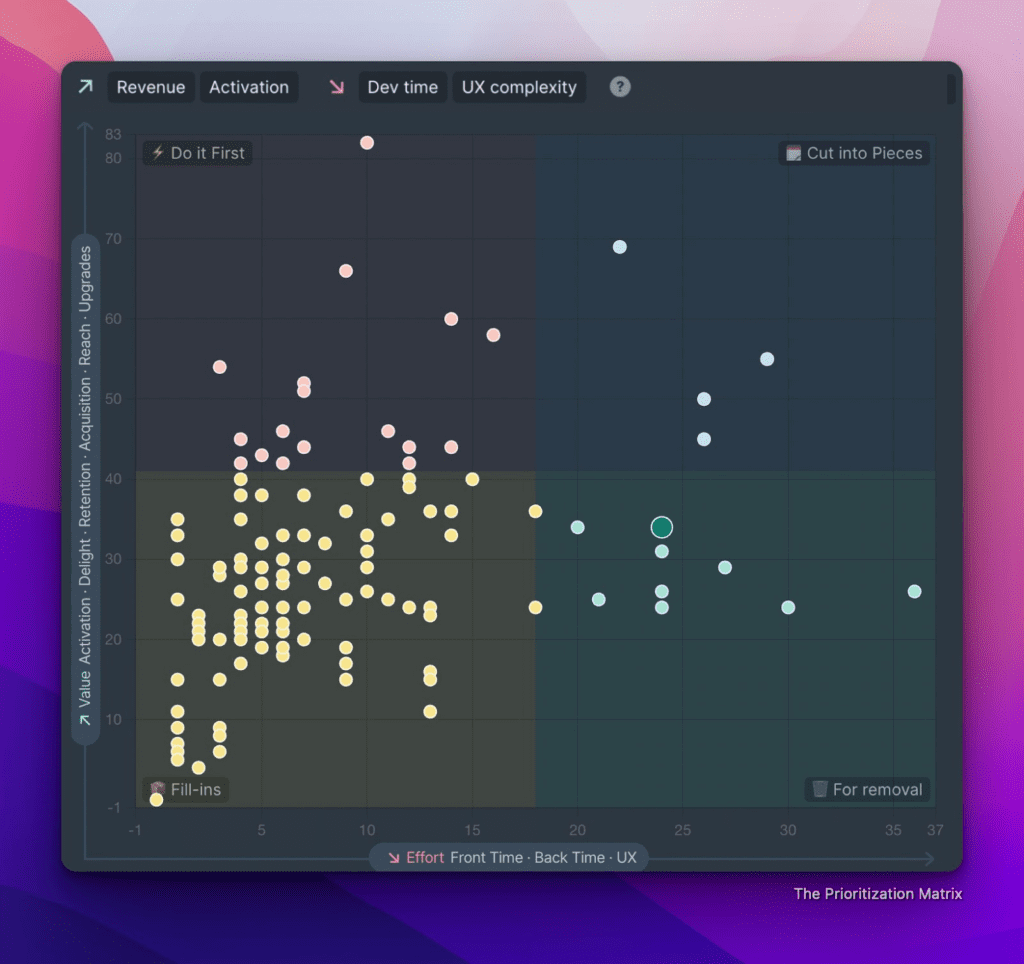
Grafik matrisi görünümü
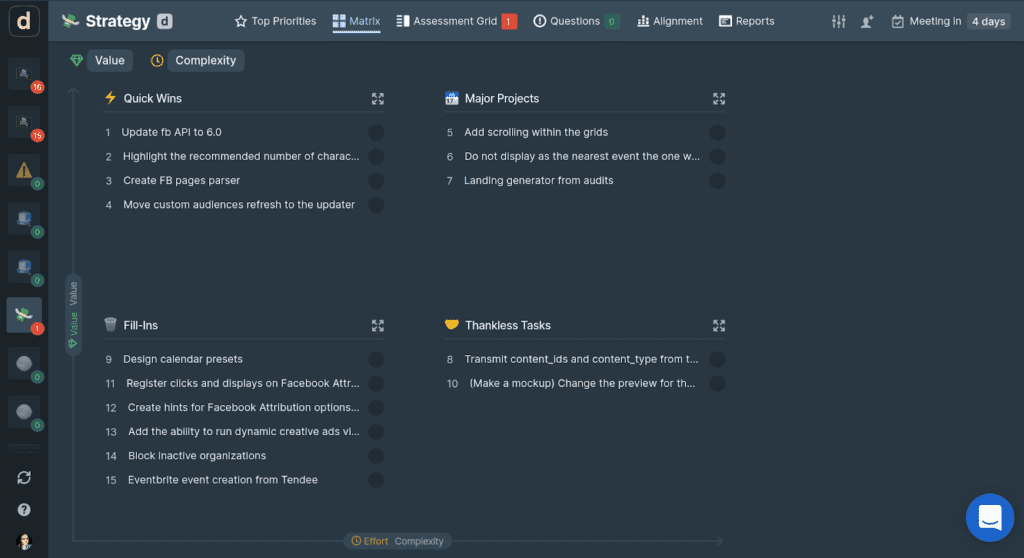
Ducalis içinde 2x2 matris liste görünümünde önceliklendirilmiş iş listesi
Öncelik matrisi ne zaman kullanılır
Sınırlı kaynaklarınız olduğunda ve bunları performansı ve yatırım getirisini maksimize etmek için rasyonel şekilde dağıtmak istediğinizde öncelik matrisi kullanın.
İş listesi görevlerini dört çeyreğe yerleştirmek, bunların iş hedefleri üzerindeki etkisini görselleştirir. Ekip çabalarını bir çeyreğe odaklayarak nereye gittiğinizi, hangi sonuçları beklemeniz gerektiğini ve ne zaman olacağını anlayın.
Çeyrekler nasıl çalışır
2x2 matrisi en verimli ve kullanımı en kolay olanıdır. İki değerlendirme kriterinden oluşur: bir pozitif (Değer, Etki, Gelir) ve bir negatif (Efor, Maliyetler, Risk).
Bu kriterlere göre değerlendirilen görevler dört çeyreğe ayrılır:
Çeyrek 4—düşük pozitif puan ve yüksek negatif puan Nankör Görevler az değer getirir ve çok maliyetlidir. Bunları silin veya değeri artırmak için çözümü yeniden değerlendirin.
Çeyrek 1—yüksek pozitif puan ve düşük negatif puan Hızlı Kazançlar, hemen olumlu sonuçlar veren düşük asılan meyvelerdir. Bu görevleri önce yapın.
Çeyrek 2—yüksek pozitif puan ve yüksek negatif puan Büyük Projeler hemen sonuç vermez ancak stratejik olarak değerlidir. Bunları yol haritanız için düşünün.
Çeyrek 3—düşük pozitif puan ve düşük negatif puan Dolgu Görevler, minimum etkiye sahip ucuz çözümlerdir. Daha fazla tartışın ve yalnızca ekstra kaynaklarınız olduğunda uygulayın.
Öncelik matrisi nasıl oluşturulur ve kullanılır
1. İş ihtiyaçlarına göre kriterleri seçin
Kendinize sorun: Şu anda en önemli olan nedir?
- Zamanın kritik olduğu son tarihlere sahip misiniz?
- Her ne pahasına olursa olsun risklerden kaçınmalı mısınız?
İki kriter hızlı, basit önceliklendirme için çalışır. Karmaşık projeler, kullanıcı davranışı aşamalarını veya iş hedeflerini kapsayan birden fazla kriter gerektirir.
Ducalis olarak, tüm hayati unsurları tahmin ediyoruz ve matrisi herhangi bir zamanda odaklanmamız gereken kriterlere göre filtreliyoruz.
Şu anda önemli olan hedefe etki eden görevleri dikkate almak için bazı kriterleri gizleriz.
2. Puan aralığına karar verin
Kriterleri tahmin ederken ekibiniz hangi sayıları kullanacak?
Her kriter net yorumla aynı ölçeği kullanmalıdır. Biz 0'dan 3'e kadar kullanıyoruz:
- 0—etki yok
- 1—düşük etki
- 2—orta etki
- 3—yüksek etki
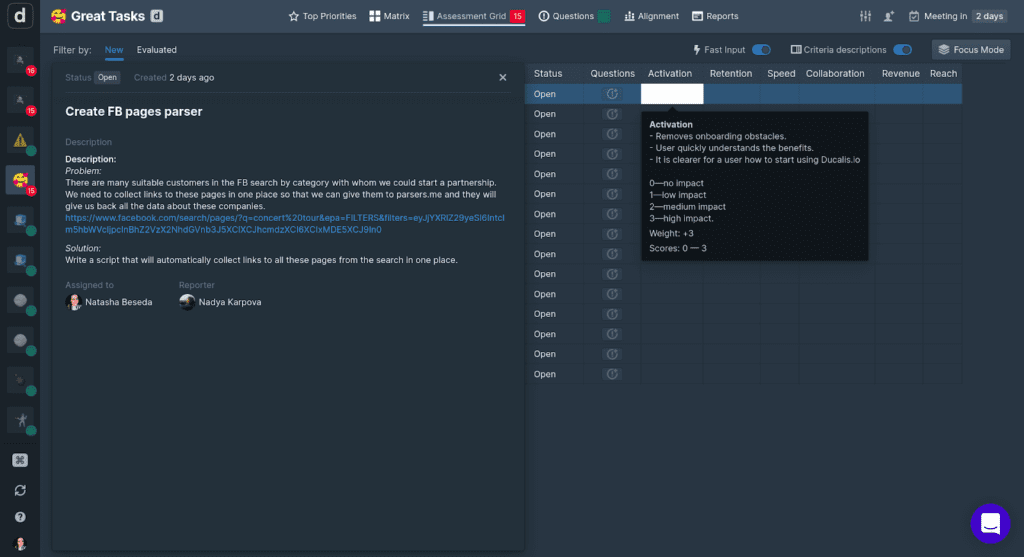
Puanların ne anlama geldiğini ezberlemek zorunda kalmamak için kriter ipuçlarını kullanıyoruz.
3. Görevleri ekibinizle tahmin edin
Projeye kim katılıyor ve benzersiz bir bakış açısı getirebilir? Proje yalnızca mühendisleri mi gerektiriyor, yoksa tasarımcılar ve metin yazarları da mı gerekli?
Her görevi tüm ekiple değerlendirmek, ortak anlayışı güçlendirir ve en iyi önceliklendirme sonuçlarını verir.
Ekibimizde:
- Yöneticiler Erişim ve Gelir'i değerlendirir
- Mühendisler ve UX/UI Geliştirme Süresini değerlendirir
- Herkes Aktivasyon, Tutma ve iki ürüne özgü kriteri (Hız ve İşbirliği) tahmin eder
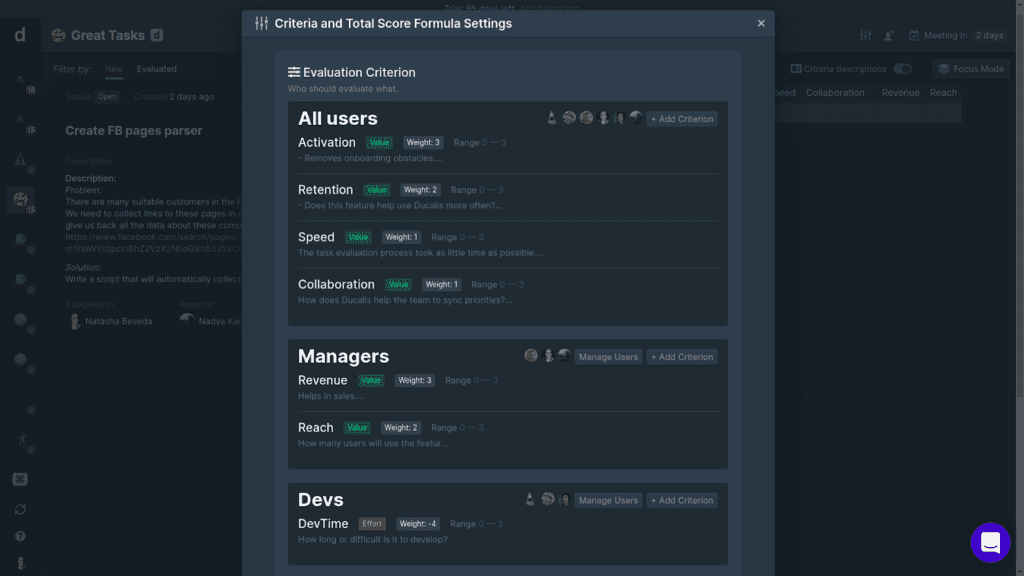
Ortak anlayışı korumak için çoğu kriteri birlikte değerlendiriyor ve spesifik olanları uzmanlara bırakıyoruz.
4. Sonuçları inceleyin ve tartışın
Bu özellikler neden zirveye ulaştı? Şu anda en değerli oldukları ve uygulanması gerektiği konusunda hemfikir misiniz?
Önceliklendirme sonuçlarını asla sorgusuz işe almayın. Önceliklendirme, doğru kararları vermenize yardımcı olacak bir araçtır, sizin için vermez.
Planlama toplantılarında en önemli önceliklerinizi ekiple tartışın. Herkesin ne yapılması gerektiğini, neden bu yaklaşımı ve neden önemli olduğunu anladığından emin olun.

Özet
Öncelik matrisleri basit ve verimlidir. Otomasyon araçları onları çok daha güçlü hale getirir. Ducalis, karmaşık önceliklendirme çerçeveleri oluşturmanıza, bunları ağırlıklı karar matrisleri veya eylem önceliği matrisleri olarak kullanmanıza ve kriter odağını anında değiştirmenize olanak tanır.
Önemli çıkarımlar:
- Net öncelikler olmadan ekipler iş hedeflerini unutur ve kişisel olarak ilgi çekici görevler üzerinde çalışır
- Kapsamlı görev değerlendirmesine ekibinizi dahil edin
- Önceliklendirme matrisleri, X görevinin neden Y görevinden daha önemli olduğunu rasyonel olarak açıklayabildiğinizde çalışır
- "Yapması kolay" veya "erişimi artırır" gibi ek kriterler yardımcı olur ve tüm ekibi değerlendirmeye dahil etmek son derece değerlidir
- Ducalis tüm bu hedeflere ulaşmanıza yardımcı olur
Matris şablonlarımızı deneyin. Kayıt olmak ücretsiz ve kullanmak ücretsiz. Kredi kartı yok. Sadece girin ve büyümeniz için önceliklendirin.